
 Sebastian Stokkendal
In This Article▼
A polished newsletter, a compelling subject line, and a strong offer do not guarantee inbox placement. Recipients can tell Gmail, Yahoo, and other mailbox providers that they do not want a message by selecting "Report spam." Those reports become an important signal about a sender's practices and can influence future filtering.
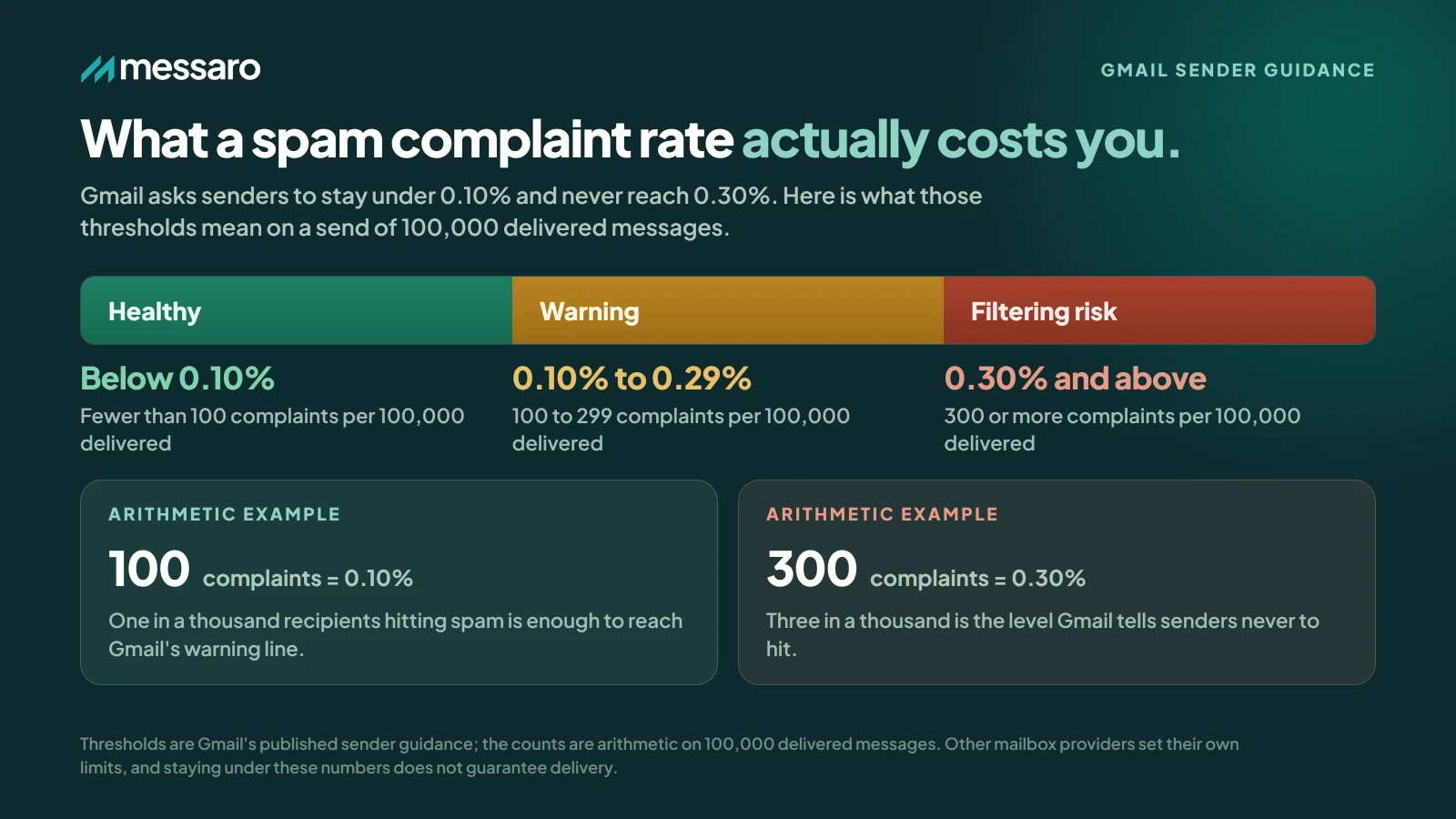
For Gmail, the practical 2026 guidance is to aim for a user-reported spam rate below 0.1% and avoid ever reaching 0.3% or higher. Yahoo requires bulk senders to keep spam complaints below 0.3%. These percentages are small because, at scale, even a fraction of a percent represents many dissatisfied recipients.
The useful question is not only whether an email reached an inbox. It is whether the recipient expected it, found it relevant, and was comfortable continuing to receive it.
What Is Email Spam Rate?
Email spam rate, also called spam complaint rate, is the percentage of delivered messages that recipients report as spam. A simple campaign calculation is:
Spam rate = spam complaints ÷ delivered messages × 100
For example, if 20 people report a campaign as spam out of 20,000 delivered messages, the calculation is:
20 ÷ 20,000 × 100 = 0.1%
Gmail Postmaster Tools uses a more specific denominator. Its user-reported spam rate is the number of messages recipients mark as spam divided by messages delivered to active users' inboxes. It is different from the share of all messages that Gmail automatically filters into spam.
That distinction is essential. A low number in Postmaster Tools does not prove that overall deliverability is healthy. If Gmail already routes many messages away from active users' inboxes, fewer people have the opportunity to report them manually, so the displayed spam rate can look deceptively low. Evaluate complaint data together with inbox placement, reputation, authentication, delivery errors, engagement, bounces, and unsubscribes.
What Is a Good Email Spam Rate in 2026?
Gmail provides the clearest numerical guidance. The table below treats 0.3% as a level to avoid, not as a target.
| Spam rate | What it means |
|---|---|
| Below 0.1% | Gmail's recommended operating range. Continue monitoring trends and related delivery signals. |
| 0.1% to below 0.3% | A warning range. Gmail says rates above 0.1% can already affect inbox delivery for bulk senders, so investigate promptly. |
| 0.3% or higher | A critical level that Gmail says can have a stronger negative impact. Senders should avoid ever reaching it. |
Yahoo requires bulk senders to keep spam complaint rates below 0.3%. For a program that sends to both providers, below 0.1% is the more cautious operating aim because it follows Gmail's recommendation. No single daily percentage, by itself, establishes good or bad deliverability.
Why Small Percentages Matter
At 100,000 delivered messages, a 0.1% rate equals 100 complaints and a 0.3% rate equals 300. At 1,000,000 delivered messages, the same rates equal 1,000 and 3,000 complaints respectively.
These are arithmetic illustrations, not evidence that every complaint carries identical weight with every provider. Providers evaluate complaint patterns alongside volume, recipient behavior, reputation history, authentication, consistency, and other signals. The examples simply show why a small-looking percentage deserves attention.
A rising rate can indicate weakening permission, irrelevant content, excessive frequency, poor acquisition quality, or subscribers who no longer remember signing up. The complaint is often a visible symptom of a broader audience or campaign problem.
Email Spam Rate and Sender Reputation
Sender reputation is the history mailbox providers associate with a sending domain and infrastructure. Gmail Postmaster Tools separates spam rate, domain reputation, IP reputation, authentication, delivery errors, and other indicators because no one metric explains the whole result.
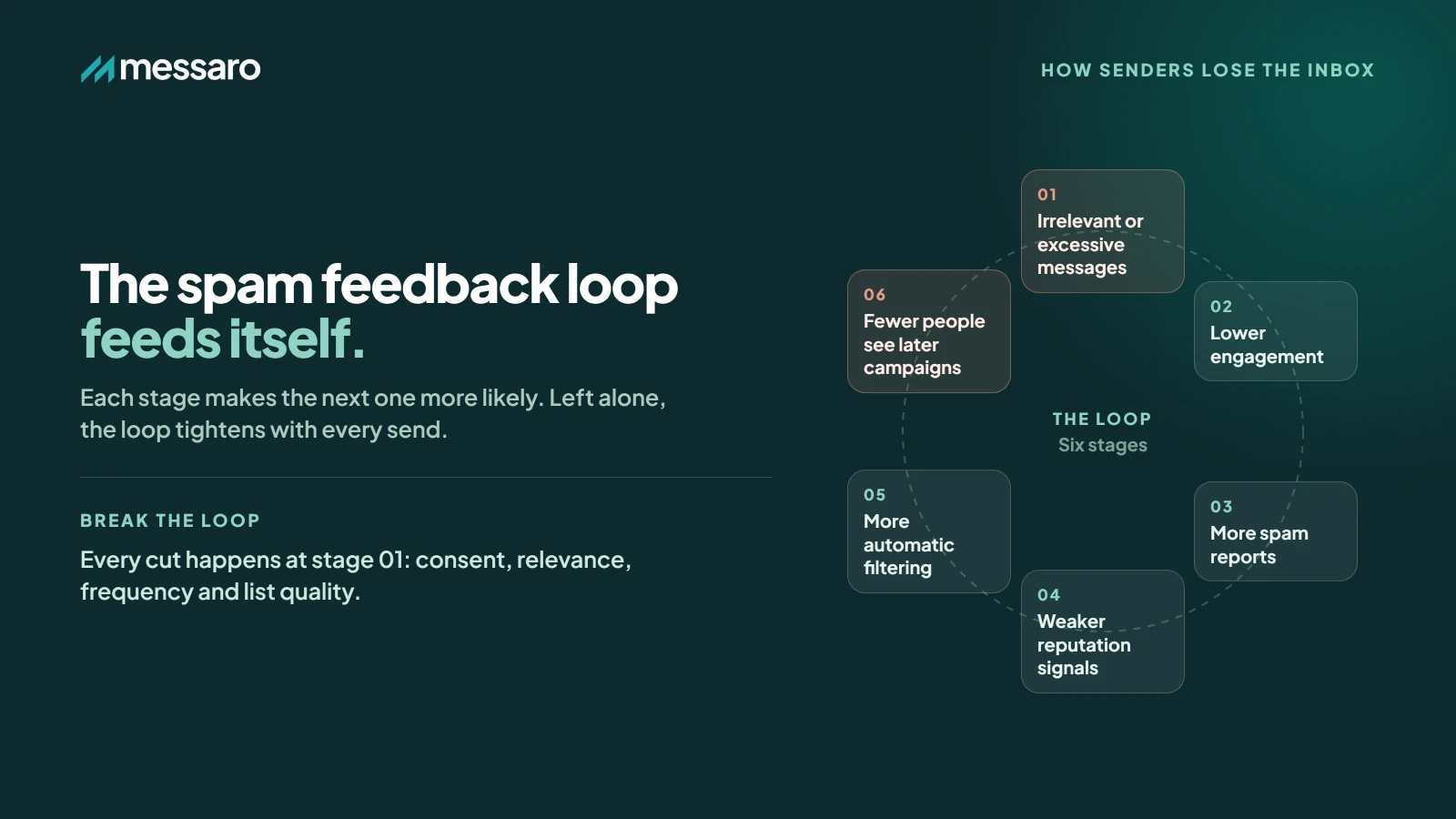
Complaint and reputation signals can form a self-reinforcing feedback sequence:
- Recipients receive messages that feel irrelevant or excessive.
- Engagement declines.
- More recipients report messages as spam.
- Reputation signals weaken.
- The risk of automatic spam filtering increases.
- Fewer recipients see and engage with later campaigns.
- Engagement and conversions may decline further.
Improvements do not produce a guaranteed recovery schedule, and no platform can promise inbox placement. The practical response is to correct consent, relevance, frequency, list quality, authentication, and sending consistency, then monitor provider and campaign signals over subsequent sends.
Gmail's 2026 Sender Requirements
Google's general sender guidance covers email sent to Gmail accounts. Its additional bulk-sender requirements apply when a domain sends more than 5,000 messages per day to personal Gmail accounts. Those requirements include SPF, DKIM, DMARC, alignment, low user-reported spam rates, and one-click unsubscribe for applicable marketing and subscribed messages.
- All senders need
SPForDKIM; bulk senders need both. - Bulk senders need a valid
DMARCrecord and domain alignment. - Sending domains or IPs need valid forward and reverse DNS records.
- Connections should use TLS and messages should follow internet formatting standards.
- Promotional and subscribed bulk messages need one-click unsubscribe support plus a visible unsubscribe link.
- Unsubscribe requests must be honored within two days.
- User-reported spam rates should stay below 0.1% and must not reach 0.3% or higher.
Review the official Gmail sender guidelines before changing a production sending setup. Smaller senders can still benefit from the same authentication, permission, and unsubscribe practices even when the bulk-sender threshold does not apply.
Yahoo's 2026 Sender Requirements
Yahoo requires bulk senders to keep spam complaint rates below 0.3%. Its bulk-sender rules also call for SPF and DKIM, a valid DMARC policy, easy unsubscribe through a one-click mechanism for applicable messages, and honoring unsubscribe requests within two days.
Unlike Gmail, Yahoo does not publish a fixed daily-volume threshold that defines a bulk sender. It describes bulk senders in terms of significant volume, so do not assume that sending fewer than 5,000 messages avoids Yahoo's requirements. Consult Yahoo Sender Best Practices for current provider guidance.
Is a Low Spam Rate Always Good?
Not necessarily. Suppose a displayed spam rate falls from 0.4% to 0.02%. That change could reflect happier recipients, but it could also occur because Gmail started filtering more messages before they reached active users' inboxes. In that case, fewer recipients can manually report the messages.
Interpret the rate alongside domain and IP reputation, authentication results, delivery errors, bounces, clicks, unsubscribes, inbox placement evidence, and campaign-level performance. A low complaint rate paired with healthy engagement and reputation is encouraging. The same rate paired with weak inbox placement and poor reputation tells a different story. For a broader measurement workflow, learn how to improve inbox placement and email deliverability.
Seven Causes of High Email Spam Rates
High complaint rates rarely have one universal cause. Each of the following problems needs its own control.
- 1. Unclear Permission People who did not knowingly request the messages, or no longer remember doing so, are more likely to report them. State what subscribers are joining and what they should expect.
- 2. Excessive Frequency Even interested subscribers can become fatigued when messages arrive too often. Test cadence against engagement and complaints instead of assuming one schedule works for every audience. This guide explains how often to send marketing emails.
- 3. Poor Relevance or Segmentation Sending one message to the entire database creates mismatches. A recent customer, a first-time prospect, and an inactive subscriber should not automatically receive identical content.
- 4. Misleading Content A deceptive subject line, false urgency, or an offer that does not match the email can make recipients feel manipulated. The sender name, subject, preview text, body, and landing page should tell a consistent story.
- 5. Difficult Unsubscribe or Preference Controls When recipients cannot leave easily or reduce the frequency, the spam button becomes the fastest exit. Use a visible unsubscribe route and, where practical, preferences for topics or cadence.
- 6. Poor List Hygiene Invalid, old, or persistently disengaged contacts weaken list quality. Define policies for hard bounces, inactivity, re-engagement, and suppression without confusing hygiene with permission.
- 7. Inconsistent Sending Patterns Sudden volume spikes or irregular behavior can trigger provider scrutiny and rate limits. Build volume carefully and keep normal cadence predictable.
Easy preference controls give a subscriber a graceful alternative to reporting spam. They do not replace permission or required unsubscribe mechanisms, but they can let someone request fewer messages or select the topics they still value.
How to Reduce Your Email Spam Rate
The goal is to build a system that makes complaints less likely, not to react to a percentage in isolation.
1. Use Permission-Based Lists
Send marketing messages only to people who clearly opted in. Do not use purchased, scraped, or questionably acquired addresses. At signup, explain the sender, content type, and likely frequency so recipients can make an informed choice.
2. Improve Relevance With Segmentation
Create understandable groups based on declared preferences, recent behavior, purchase history, engagement, location, or lifecycle stage. A customer who bought yesterday should not receive a first-purchase prompt. Good segmentation operationalizes relevance, while permission still determines whether marketing should be sent at all.
3. Control Sending Frequency
Frequency is a separate decision from relevance. A useful message can still become unwelcome when repeated too often. Review complaint, unsubscribe, click, and conversion patterns by cadence and segment. Let recipients choose frequency where practical.
4. Monitor Engagement and List Hygiene
Do not treat continued presence on a list as proof of interest. Review recent clicks, conversions, purchases, and other meaningful activity. Define an inactivity window that fits the business cycle, use a limited re-engagement sequence where appropriate, and suppress contacts who remain unengaged according to a documented policy.
5. Make Unsubscribing Straightforward
A recipient who no longer wants marketing is not necessarily a lost customer. Make the unsubscribe link obvious, support provider-required one-click methods for applicable messages, process requests promptly, and consider a preference center for people who want fewer emails rather than none.
6. Authenticate the Sending Domain
SPF, DKIM, and DMARC help providers verify the relationship between a message and its domain. Authentication does not create permission or guarantee placement, but missing or misaligned records can undermine otherwise responsible sending. Messaro supports SPF and DKIM domain verification. DMARC should be configured and monitored through the sender's DNS provider and suitable external tools.
7. Keep Sending Behavior Consistent
Avoid sudden increases in daily volume, abrupt changes in audience quality, and large untested shifts in content. Introduce changes gradually, start with recent engaged subscribers, and pause expansion when complaints, deferrals, bounces, or provider feedback deteriorate.
8. Monitor Reputation and Campaign Performance
Use Gmail Postmaster Tools for eligible Gmail traffic and review spam rate, domain reputation, IP reputation, authentication, and delivery errors. Combine that provider view with campaign analytics for delivery, clicks, conversions, bounces, unsubscribes, and complaint trends. No one dashboard offers a complete placement diagnosis.
Reports
Campaign performance and analytics
142
Total created
512,480
Total sent
98,240
Total received
19.2%
Average
Performance by Type
Response rates by campaign type
Response Trends
Performance over time
Top Performing Campaign
Best based on response rate
Summer Kickoff
March 5th, 2026
25.7%
Response Rate
12,480
Sent
3,210
Responses
99.2%
Delivery
SINGLE
Type
9. Investigate Campaign-Level Complaints
An account average can hide a problematic send. An overall complaint rate of 0.05% may look healthy, while one promotional campaign produces 0.25%. Investigate that campaign's permission source, audience selection, cadence, subject-line accuracy, offer, and content instead of assuming the account average tells the full story.
Why Email Marketing Platforms Matter
As an audience grows, manually tracking engagement, building segments, scheduling campaigns, maintaining automations, testing variations, and comparing results becomes difficult. A capable email marketing platform can make those practices easier to execute, but software does not erase complaints or replace responsible strategy.
Useful capabilities include audience segmentation, campaign analytics, automated workflows, templates, A/B testing, engagement monitoring, and coordinated campaign management. Teams evaluating their options can review this guide to the best email marketing platform for small businesses. The right choice should fit the team's audience, consent process, technical setup, workflow, and reporting needs.
How Messaro Supports Measured Campaign Management
Messaro offers email and SMS campaigns, AI-assisted copy and subject lines, segmentation, automations, templates, campaign analytics, SPF and DKIM domain verification, A/B testing, and shared conversations. It has a free plan and paid plans, without making inbox placement or complaint-rate guarantees.
These capabilities help teams put relevance into practice. Marketers can build a segment for recent customers, another for engaged prospects, and a separate re-engagement audience. Automations can apply defined triggers, conditions, and actions, while analytics and A/B testing help compare measured campaign outcomes. AI assistance can draft copy and subject-line options, but a person should verify accuracy, tone, permission, and audience fit.
Email and SMS can also be coordinated from one platform, with shared conversations helping teams retain customer context. The objective is not simply to send more. It is to organize campaigns around the right audience, message, channel, and timing. Businesses building a broader program can start with this guide to using email marketing to grow a business.
The 2026 Email Spam Rate Checklist
Before launching a major campaign, review each control separately:
- Permission: Did every recipient knowingly opt in to this type of marketing?
- Relevance: Is the message useful to this specific audience?
- Frequency: Have these subscribers received too many recent messages?
- Segmentation: Are different lifecycle and interest groups receiving appropriate content?
- Authentication: Are SPF and DKIM valid, and is DMARC correctly configured and aligned where required?
- Unsubscribe: Can recipients easily stop or change applicable marketing messages?
- Engagement: Is there a documented policy for persistently inactive contacts?
- Monitoring: Are complaints, bounces, unsubscribes, reputation, authentication, and delivery errors being reviewed?
- Consistency: Has volume or sending behavior changed unexpectedly?
- Content: Does the email deliver exactly what its sender name, subject line, and preview text promise?
Final Thoughts
A good Gmail user-reported spam rate in 2026 is below 0.1%. A rate of 0.3% is not a target. Gmail says senders should avoid ever reaching 0.3% or higher, and Yahoo requires bulk senders to remain below 0.3%.
The larger lesson is that one daily number cannot summarize deliverability or subscriber trust. A spam rate can appear artificially low when messages are already filtered away from inboxes. Read it with provider reputation, authentication, campaign engagement, bounces, unsubscribes, sending patterns, and placement evidence.
Complaints are shaped by separate but connected controls: permission establishes whether contact is appropriate, relevance determines whether the message fits, frequency limits fatigue, authentication establishes domain identity, list hygiene removes invalid or persistently inactive addresses, and sending consistency helps providers interpret normal behavior.
Build campaigns around the people who actually want to hear from the business. Use software to support segmentation, automation, testing, and measurement, while keeping consent, judgment, and honest communication at the center.
Frequently Asked Questions
What is considered a good email spam rate in 2026?
For Gmail, aim to keep the user-reported spam rate below 0.1% and avoid ever reaching 0.3% or higher. Yahoo requires bulk senders to keep complaint rates below 0.3%. Interpret either figure with reputation, placement, engagement, authentication, and campaign-level results.
Is a 0.3% email spam rate good?
No. Gmail treats 0.3% or higher as a level with stronger negative consequences, not a benchmark to pursue. Its recommendation is below 0.1%. Yahoo's below-0.3% rule is a ceiling for bulk senders, not evidence that a rate close to that boundary is healthy.
How can I reduce my email spam rate?
Start with clear permission, relevant segmentation, a reasonable cadence, honest subject lines, easy unsubscribe options, correct authentication, list-hygiene policies, consistent sending, and campaign-level monitoring. Diagnose which control failed rather than changing everything at once.
Where can I check my Gmail spam rate?
Google Postmaster Tools reports eligible traffic. Its spam-rate dashboard measures user spam reports divided by messages delivered to active users' inboxes. It does not measure the percentage that Gmail automatically sent to spam, so review its reputation, authentication, and delivery-error dashboards too.
Can an email marketing platform reduce spam complaints?
A platform can support segmentation, automations, templates, testing, and analytics that help teams send more relevant campaigns. Technology alone cannot guarantee fewer complaints or inbox placement. Permission, content, cadence, list governance, authentication, and recipient response remain decisive.