
 Sebastian Stokkendal
In This Article▼
Email deliverability has changed considerably since Gary Thuerk sent a commercial message to about 400 ARPANET users in 1978. That campaign reportedly generated $13 million in sales, but its result reflected the offer, audience, timing, and the unusual context of early digital communication. Novelty alone is not a repeatable deliverability strategy.
Today, Gmail, Outlook, Yahoo, and other mailbox providers evaluate authentication, sender reputation, complaint rates, engagement patterns, sending consistency, domain and IP history, and message content. A legitimate campaign can be accepted by the recipient's server and still be filtered somewhere the recipient is unlikely to notice.
Improving results starts with separating two related measurements, then correcting the technical and behavioral signals that influence each one. This guide explains a practical process for doing that in 2026.
Delivery Rate and Inbox Placement Are Different
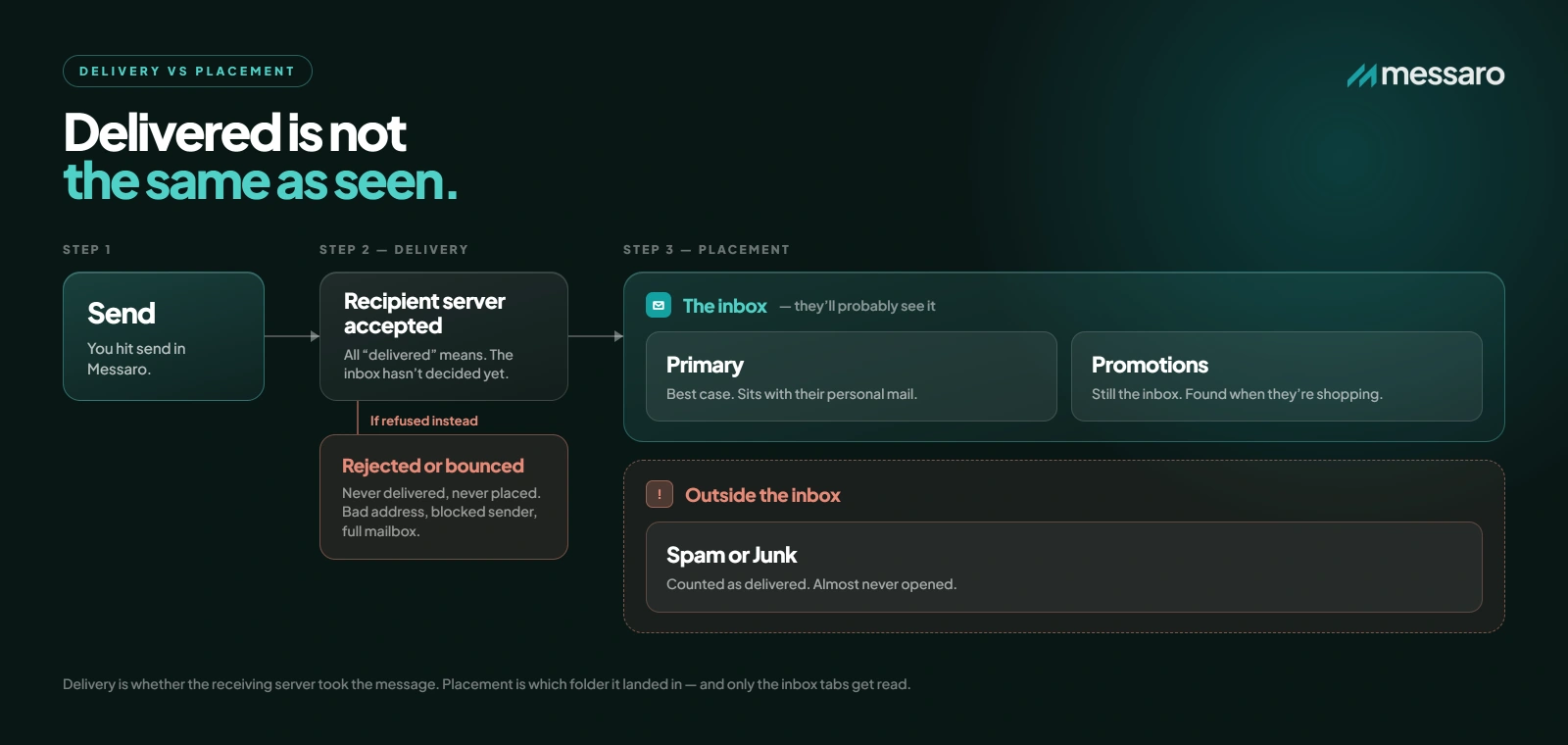
Delivery rate measures the percentage of sent messages accepted by recipient mail servers after subtracting bounces and other rejections. An accepted message has been delivered to the mailbox provider, but acceptance does not tell you where the provider placed it.
Inbox placement describes whether an accepted message reaches an inbox surface instead of spam or junk. Gmail's Primary, Promotions, and Social tabs are all inbox categories. A message in Promotions has not failed delivery and should not be treated as equivalent to spam. Placement also varies by recipient because providers personalize filtering based on individual behavior.
For example, a campaign might show a 98% delivery rate because 980 of 1,000 messages were accepted. Some of those 980 messages may still enter spam or junk, while others may appear in Primary or Promotions. Standard campaign analytics usually cannot identify exact folder placement, so seed testing and provider-specific reputation tools may be needed for a fuller picture.
There is no universal healthy inbox placement percentage that applies to every sender. Published benchmarks vary by mailbox provider, audience, message type, seed-list coverage, and measurement method. Treat your own established baseline as the most useful comparison. A sustained decline, an unusual provider-specific drop, or a rate materially below your normal range deserves investigation.
Current Bulk Sender Requirements
Authentication is now a baseline requirement for high-volume and bulk mail, not an optional optimization. The details differ by provider:
- Gmail: Domains sending more than 5,000 messages per day to personal Gmail accounts must use
SPF,DKIM, andDMARC. Gmail requires spam rates in Postmaster Tools to remain below 0.3% and recommends keeping them below 0.1%. Promotional or subscribed bulk messages must support one-click unsubscribe and include a clear unsubscribe link. Review the official Gmail sender guidelines. - Yahoo: Bulk senders must authenticate with both
SPFandDKIM, publish a validDMARCpolicy of at leastp=none, and meet alignment requirements. Yahoo requires easy unsubscribe support for marketing and subscribed mail, and recommends the RFC 8058 one-click method. Yahoo classifies bulk senders by significant volume but does not publish a fixed threshold. See Yahoo Sender Best Practices. - Outlook consumer domains: Microsoft's requirements apply to domains sending more than 5,000 messages per day to Outlook.com, Hotmail.com, and Live.com recipients. Those domains must comply with
SPF,DKIM, andDMARC, with a policy of at leastp=noneand alignment through SPF or DKIM. Microsoft also expects a functional unsubscribe mechanism for marketing mail. Read Microsoft's high-volume sender requirements.
These thresholds describe provider enforcement rules, not a reason for smaller senders to skip authentication. Every sender benefits from protecting its domain and making consent and opt-out controls easy to use.
How to Improve Inbox Placement in 2026
Step 1: Fix SPF, DKIM, and DMARC Records
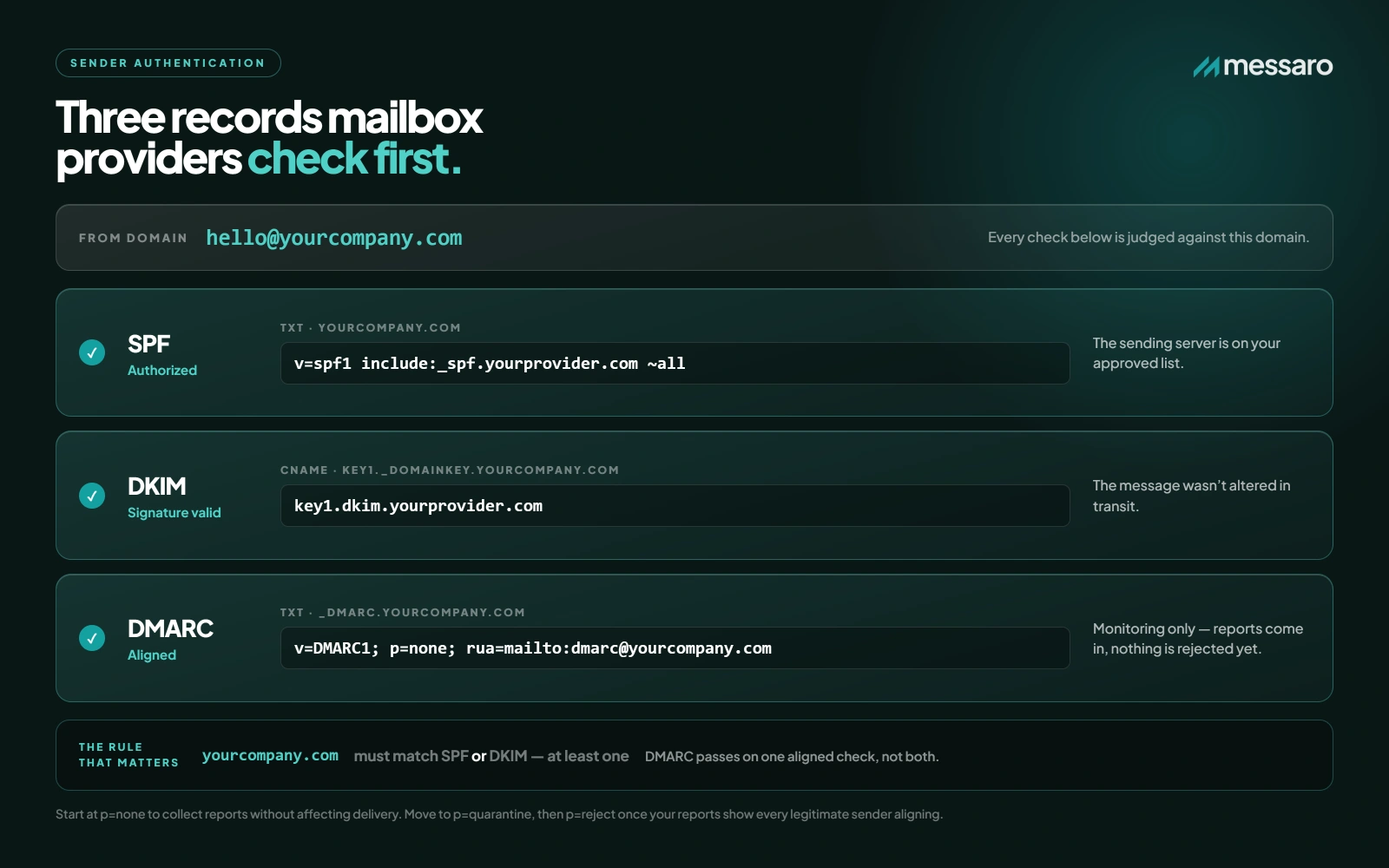
Start by confirming that every legitimate sending service is authenticated for the domain shown to recipients. A campaign platform, transactional service, CRM, support tool, and website form can all send on behalf of the same organization, so inventory the full sending environment before changing DNS.
SPF: Publish one valid record for the sending domain, include every authorized source, and remain within the protocol's limit of 10 DNS-querying mechanisms.DKIM: Confirm that each selector resolves, the public key matches the signing service, signatures validate, and a 2048-bit key is used where the provider supports it.DMARC: Publish the record at_dmarc, begin with a monitored policy such asp=nonewhen appropriate, and verify that SPF or DKIM aligns with the visible From domain.- Check authentication results in real message headers across Gmail, Yahoo, and Outlook test accounts.
- Retest after any DNS, platform, or sending-domain change.
MXToolbox and dmarcian can help diagnose public DNS records. Google Postmaster Tools provides Gmail spam-rate, reputation, and authentication data when enough traffic is available. Microsoft SNDS provides IP-level data for eligible Outlook traffic. These tools describe different parts of the delivery path, so do not expect one dashboard to explain every placement decision.
Step 2: Monitor DMARC Reports
DMARC aggregate reporting helps you identify systems sending with your domain and see whether their messages pass aligned SPF or DKIM. Add an aggregate-reporting destination with the rua tag, using a mailto URI such as rua=mailto:dmarc@example.com.
The optional ruf tag requests forensic or failure reports and is also normally configured with a mailto URI, for example ruf=mailto:dmarc-failures@example.com. It is not a report-to-URL tag. Many mailbox providers do not send forensic reports, and those that do may redact data for privacy. Plan around aggregate rua reports rather than depending on ruf.
Raw aggregate XML can be difficult to interpret. A suitable external DMARC monitoring service, such as dmarcian, Postmark's DMARC tools, or Red Sift OnDMARC, can group sources and highlight alignment failures. Configure DMARC with your DNS provider, verify the reporting mailbox or service, and review results before moving to a stricter policy.
What to look for in DMARC reports:
- Known platforms that fail SPF, DKIM, or alignment
- Authorized services missing from your sending inventory
- Unknown sources that may indicate spoofing or forgotten tools
- Sudden changes in volume by source, provider, or geography
- Forwarding patterns that can affect SPF and require DKIM or ARC support
Step 3: Clean and Segment Your Email List
List quality affects bounces, complaints, and engagement. It also affects whether your messages remain useful to recipients. Use confirmed consent where appropriate, never buy lists, and make unsubscribing straightforward.
A practical cleaning workflow is:
- Suppress hard bounces immediately and stop retrying addresses the recipient server has identified as permanently invalid.
- Separate temporary failures from permanent failures, then follow your email service provider's retry and suppression rules.
- Define inactivity using your normal purchase cycle and sending frequency. Six to twelve months may be reasonable for some brands, but a seasonal business may need a different window.
- Send a limited re-engagement sequence with a concrete subject line such as "Would you still like product updates?" or "Choose the emails you want to receive."
- Suppress subscribers who remain inactive after the sequence, while preserving records needed for consent and unsubscribe compliance.
- Repeat the review on a schedule suited to your send volume rather than relying on a one-time cleanup.
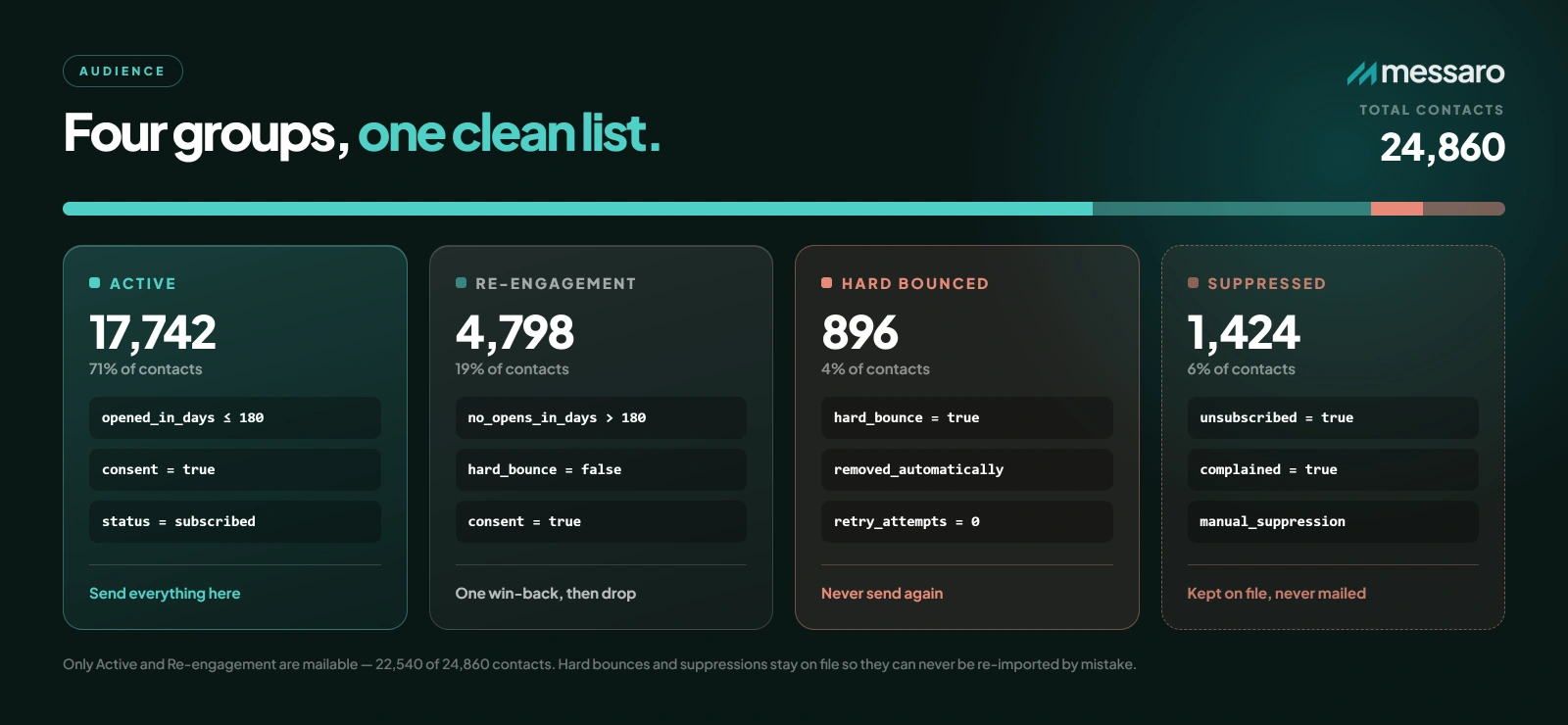
Validation services such as ZeroBounce, NeverBounce, and Bouncer can flag malformed or risky addresses before a send, but validation does not replace consent. Segmentation can keep messages relevant by separating active customers, recent subscribers, and re-engagement audiences. If you are planning a broader program, review how to use email marketing to grow your business and choose a cadence with this guide to how often to send marketing emails.
Step 4: Warm Up New Domains and Dedicated IPs Carefully
A new sending domain or dedicated IP has little reputation history. Introduce traffic gradually, beginning with recipients who recently opted in or consistently engage. Shared-IP customers usually do not control IP warm-up themselves, so confirm responsibilities with the email service provider.
The following is an example starting plan for a sender whose list quality, infrastructure, and engagement have already been validated:
- Week 1: Send 50–100 messages per day to the most engaged contacts.
- Week 2: Move toward 200–500 messages per day if bounces, complaints, and provider feedback remain healthy.
- Week 3: Move toward 1,000–2,000 messages per day only if prior sends perform normally.
- Week 4 and beyond: Continue toward regular volume in controlled increments, split by mailbox provider when practical.
This is not a universal or guaranteed schedule. Appropriate volumes depend on prior domain use, list size, message type, provider mix, sending infrastructure, and recipient response. Increase rates only when engagement and provider feedback support the next step. Pause and investigate when complaints, deferrals, blocks, or reputation indicators deteriorate.
- Send to recent, engaged subscribers first.
- Keep daily volume and cadence consistent.
- Monitor complaints, hard bounces, deferrals, and authentication failures by provider.
- Avoid sudden volume spikes or major content changes during warm-up.
- Do not advance the plan until negative signals are understood.
Step 5: Test Subject Lines and Message Content
Subject lines influence recipient expectations and engagement, but no list of individual "spam words" can predict placement. Providers evaluate the full message and the sender's history. Write concrete, relevant language that matches the landing page and the content of the email.
Trustworthy examples include "Your August account summary is ready," "Three ways to prepare your store for fall," and "20% off summer styles through Monday." Avoid misleading curiosity gaps, false reply prefixes, excessive punctuation, unsupported urgency, or personalization that feels intrusive.
- Keep the sender name, subject line, preview text, and offer consistent.
- Check that links work, the text-to-image balance is readable, and the HTML has a plain-text alternative.
- Make promotional intent and any important terms clear.
- Include an easy-to-find unsubscribe link and required sender information.
- Test rendering and accessibility on major mobile and desktop clients.
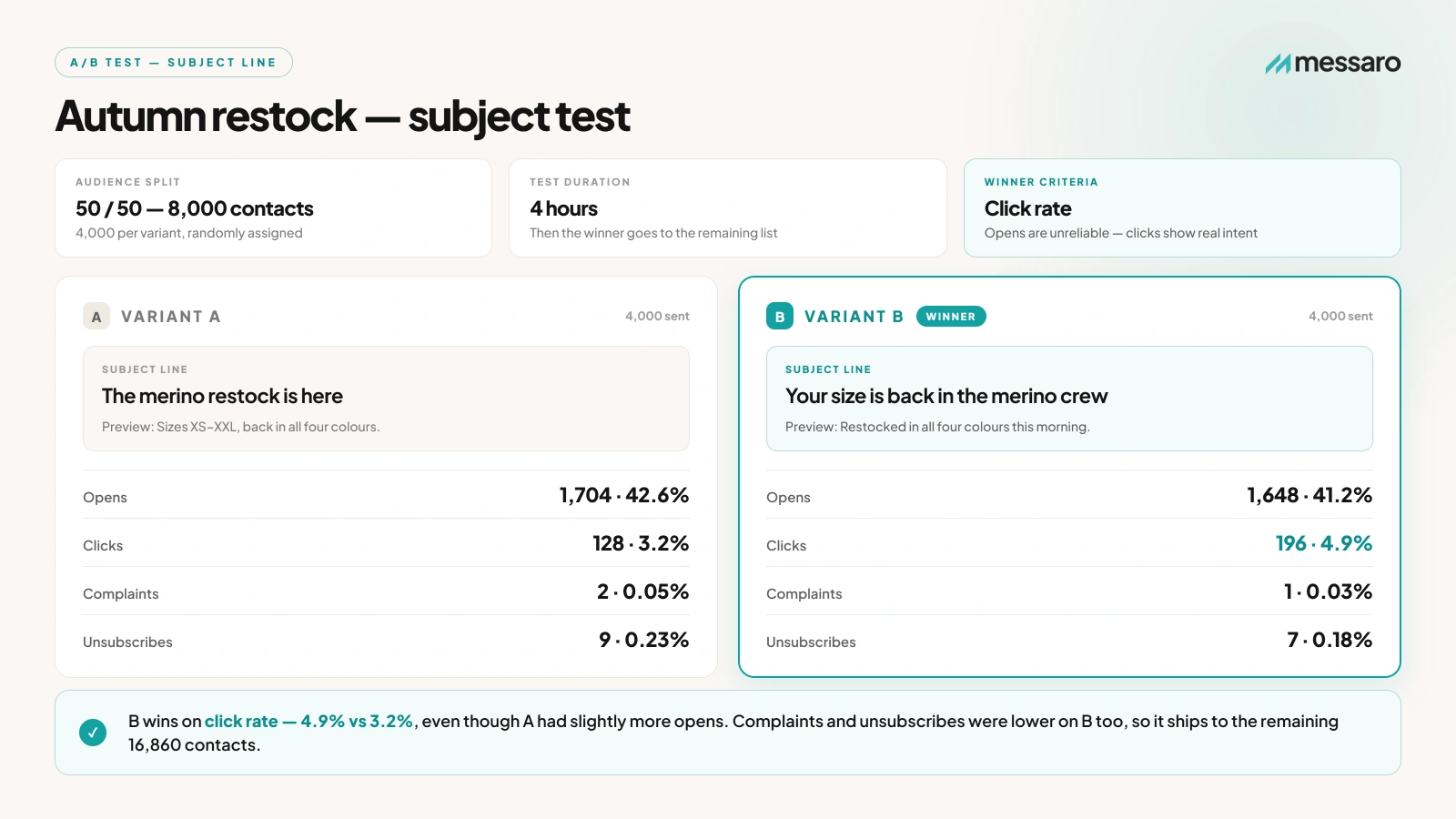
A/B test one meaningful variable at a time. For example, send two accurate subject lines to randomized samples, choose the winner using a metric matched to the campaign goal, and account for sample size before drawing conclusions. Opens are directionally useful but affected by privacy features, so consider clicks, conversions, complaints, and unsubscribes as well. Messaro supports subject-line A/B testing and campaign analytics for this workflow.
AI can help create useful variants, but a person should verify accuracy, tone, and relevance. Learn more about LLM-powered email marketing before incorporating generated copy into a production campaign.
Diagnose Problems by Provider and Signal
When performance drops, avoid changing authentication, list strategy, content, and volume at the same time. Isolate the pattern first:
- High bounce or rejection rate: Review SMTP responses, DNS authentication, blocklist status, recipient validity, and provider-specific limits.
- Good delivery rate but weak inbox placement: Review complaint trends, engagement, domain and IP reputation, sending consistency, and message relevance.
- One provider performs poorly: Use that provider's feedback tools and compare authentication, volume, and complaint data with other providers.
- A sudden decline after a platform change: Confirm SPF authorization, DKIM signing, return-path configuration, DMARC alignment, and tracking-domain setup.
- Promotions-tab placement: Treat this as successful inbox delivery. Optimize for relevance and engagement rather than trying to disguise promotional mail as personal correspondence.
Sender reputation usually changes over multiple campaigns. Recovery time depends on the severity and duration of the problem, current complaint levels, list quality, sending consistency, and each provider's evaluation window. No responsible platform can promise a fixed recovery period or guaranteed inbox placement.
How Messaro Supports Better Sending Practices
Messaro provides guided SPF and DKIM domain verification, AI subject-line generation, A/B testing, segmentation, AI copy assistance, and campaign analytics. These capabilities can help teams authenticate supported sending domains, create and test clearer campaigns, tailor messages to relevant audiences, and monitor results.
DMARC should be configured with your DNS provider and monitored with a suitable external reporting tool. Messaro does not replace provider postmaster dashboards, independent placement tests, or careful list governance. Inbox placement still depends on authentication, consent, reputation, sending behavior, message quality, and recipient response.
If you are comparing campaign tools, see this guide to choosing the best email marketing platform for small businesses. Consider Messaro alongside your authentication, consent, testing, and reporting requirements.
Frequently Asked Questions
What is a healthy inbox placement rate in 2026?
There is no universal percentage. Results vary by provider, audience, campaign type, and measurement method. Establish a reliable baseline for your own program, then investigate sustained declines, provider-specific anomalies, or results materially below that baseline.
Do I need DMARC if I send fewer than 5,000 emails per day?
Provider enforcement thresholds are not identical. Gmail and Outlook consumer-domain requirements use a threshold of more than 5,000 messages per day, while Yahoo does not publish a fixed bulk-sender threshold. Even below those levels, DMARC helps protect the domain from spoofing and provides visibility into authentication. Begin with monitoring and seek qualified guidance before moving to p=quarantine or p=reject.
How long does sender reputation recovery take?
There is no dependable fixed timeline. A small issue corrected quickly may improve over several campaigns, while persistent complaints, poor list acquisition, or severe blocking can take much longer. Monitor provider feedback and advance only when the underlying signals improve.
Can AI improve inbox placement?
AI can assist with subject-line variants, copy editing, segmentation ideas, and campaign analysis. It cannot override authentication failures, poor consent, high complaint rates, or provider filtering. Treat AI as a drafting and analysis aid, then verify every recommendation against recipient needs and measured results.
What is the difference between delivery and inbox placement?
Delivery means the recipient's mail server accepted the message. Inbox placement describes whether an accepted message appears in an inbox category rather than spam or junk. Gmail Promotions is an inbox category, not a delivery failure.