 Sebastian Stokkendal
In This Article▼
Creating an effective email marketing campaign involves much more than writing a subject line and adding a few paragraphs. Businesses need to develop engaging copy, choose relevant images, organise content into a clear layout, maintain consistent branding, and create compelling calls to action. Each element influences how recipients experience the message and whether they decide to take the next step.
For small businesses, growing brands, and marketing teams, completing all these tasks can consume valuable time. Traditional email design often requires switching between copywriting tools, image editors, design software, and email marketing platforms. Even experienced marketers can spend hours refining an email before it is ready to send.
Messaro is changing this process with its advanced AI builder feature, designed to transform a simple description into a complete email template. Instead of starting with a blank canvas, users can describe the campaign they want to create and let AI generate the email's layout, imagery, and copy.
The idea is straightforward. You explain what you want to communicate, and Messaro creates a designed email that you can review, customise, and prepare for your audience. You can then refine the result through conversational instructions, make changes directly in the visual editor, or generate new images when the design needs improvement.
In this guide, we will explore how the AI builder feature works, what capabilities it offers, how to use it step by step, and how businesses can incorporate AI generated email designs into their marketing strategies.
What Is Messaro's AI Email Builder?
Messaro's AI email builder is a tool that helps users create complete email designs from natural language instructions. Rather than requiring marketers to manually assemble every element, it uses a campaign description and available brand context to generate a starting design.
The builder can analyse a business website to understand its colours, brand voice, and products. It then uses that context to develop the email's structure, imagery, and written content.
For example, an online skincare brand could request an email announcing a new moisturiser. Instead of manually writing the headline, selecting product images, arranging content blocks, and designing a promotional button, the marketer can describe the intended campaign in one prompt.
The system can use the brand's website as a reference and produce an email that reflects its visual identity and product offering. The user can then inspect the generated design and adjust anything that does not match the campaign's requirements.
The main advantage of this AI builder feature is that it brings several creative tasks into one workflow. Copywriting, visual design, and initial layout creation become part of the same process, reducing the need to build every campaign element independently.
It is important to remember that AI generated content still needs human review. Product details, pricing, promotional terms, links, and other factual information should be checked before a campaign is sent.
Why Businesses Need a Smarter Approach to Email Design
Email marketing remains an important channel for businesses that want to nurture leads, communicate with existing customers, introduce products, and encourage repeat purchases. However, producing emails consistently can become difficult when teams have limited resources.
A traditional workflow may require a marketer to write the copy, send it to a designer, review the first layout, request revisions, and transfer the approved design into an email platform. Even small changes can introduce additional rounds of feedback.
Businesses managing multiple campaigns face another challenge. A promotional email, product announcement, welcome message, and monthly newsletter may each require a different structure while maintaining the same brand identity.
Messaro's AI builder feature helps simplify the initial creative process by generating a complete email from a description. Instead of spending the first hour assembling a layout, marketers can begin with a working design and focus their attention on improving the message.
This can be especially helpful for:
- Small businesses without a dedicated email designer.
- Ecommerce brands launching new products or seasonal promotions.
- Marketing agencies managing campaigns for several clients.
- Startups that need to communicate professionally while working with limited resources.
- Established marketing teams that want to explore campaign concepts more quickly.
AI assisted design does not eliminate the need for marketing strategy or creative judgement. It gives teams a more efficient starting point so they can spend more time evaluating the campaign's message, relevance, and purpose.
Key Features of Messaro's AI Email Builder
1. Generate a Complete Email From One Prompt
The most distinctive capability is the ability to describe an email in ordinary language and receive a designed template.
You do not need to begin by choosing every content block or writing each section individually. Instead, explain the purpose of the email, identify the audience, and describe the main action you want recipients to take.
For example, you could enter:
“Create a product launch email for our new organic skincare range. Use our brand colours, highlight three product benefits, include product imagery, and add a button inviting customers to explore the collection.”
The builder can use this direction to create the initial structure, copy, and imagery for the campaign.
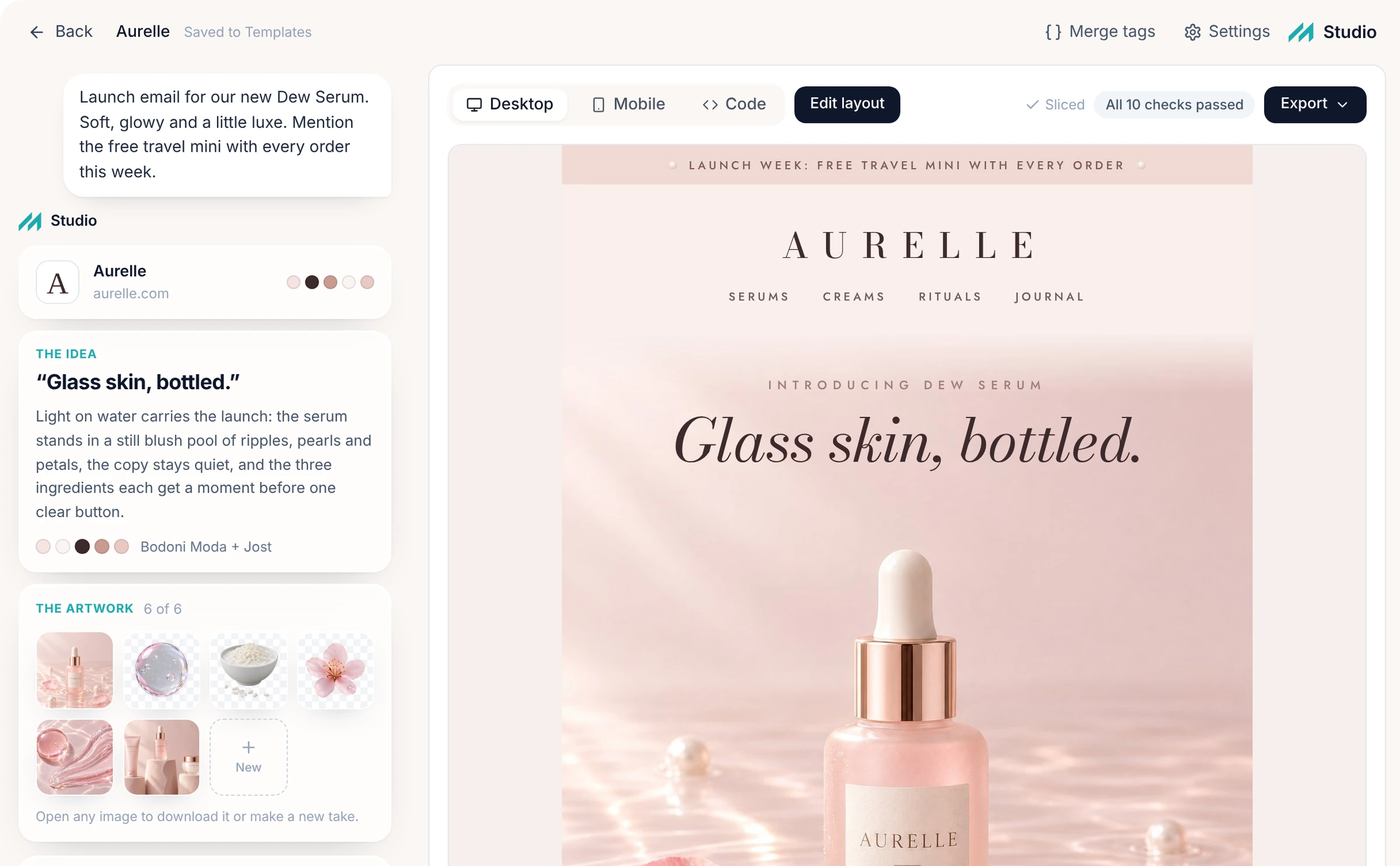
A more detailed prompt generally provides better guidance. Mention the intended audience, product, tone, key message, and call to action. If you are promoting a limited time offer, include the approved discount and campaign dates so the resulting draft has the correct context.
This prompt based approach makes the AI builder feature accessible to users who may not have advanced design or coding skills.
2. Website Based Brand Understanding
Maintaining brand consistency is essential when businesses send emails regularly. Customers should be able to recognise a company's identity through its colours, tone, imagery, and communication style.
Messaro's builder can read a business website to identify relevant brand information, including colours, voice, and products. This gives the AI a foundation for creating an email that relates to the business rather than relying entirely on a generic design.
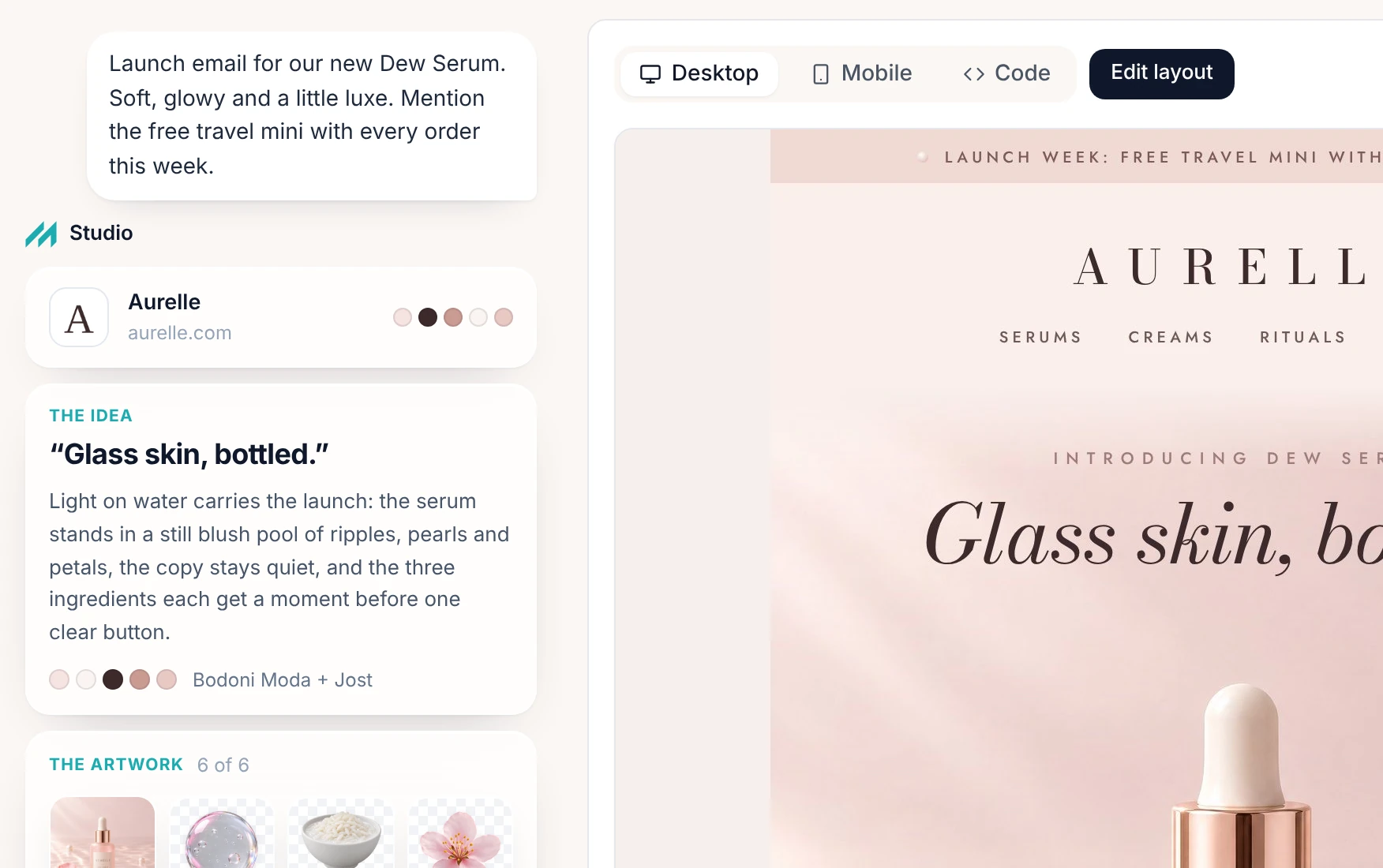
For example, a premium jewellery brand may use elegant typography, restrained colours, and high quality product imagery. A sportswear company may prefer bold headlines, energetic language, and prominent product photography.
A website informed approach can help the generated email reflect these differences.
However, marketers should still check the result against their official brand guidelines. Websites may contain outdated promotions, inconsistent design elements, or several product categories with different visual styles. Reviewing the generated email ensures that the campaign reflects the intended brand identity.
3. AI Generated Copywriting
An attractive design cannot compensate for unclear messaging. The headline, supporting text, product descriptions, and calls to action must give recipients a reason to engage.
The AI builder feature can generate written content as part of the email design. This allows the layout and copy to be developed together rather than treated as separate tasks.
For a product announcement, the AI might create a headline introducing the product, a short explanation of its benefits, supporting content, and a button linking to the product page.
For a newsletter, the structure could include an introductory message, featured content, and links to relevant resources.
The generated copy should be treated as a first draft rather than a final marketing decision. Review the wording for accuracy, remove unnecessary claims, and make sure the message reflects the way your business communicates with customers.
You should also verify that the email offers a clear benefit to its intended audience. A message can be grammatically correct and visually appealing while still failing to answer the customer's most important question.
4. Automatic Layout and Visual Structure
Email layout determines how readers move through a message. A well organised design makes important information easy to find and directs attention towards the intended action.
Messaro's builder generates the email's layout alongside its imagery and copy. This helps establish an initial hierarchy between the headline, supporting content, product sections, and calls to action.
A product launch might require a prominent hero image, a headline, a short introduction, product details, and a purchase button. An educational newsletter may work better with a clear heading, several content sections, and links to longer resources.
The goal is to create a structure that suits the campaign rather than forcing every message into the same template.
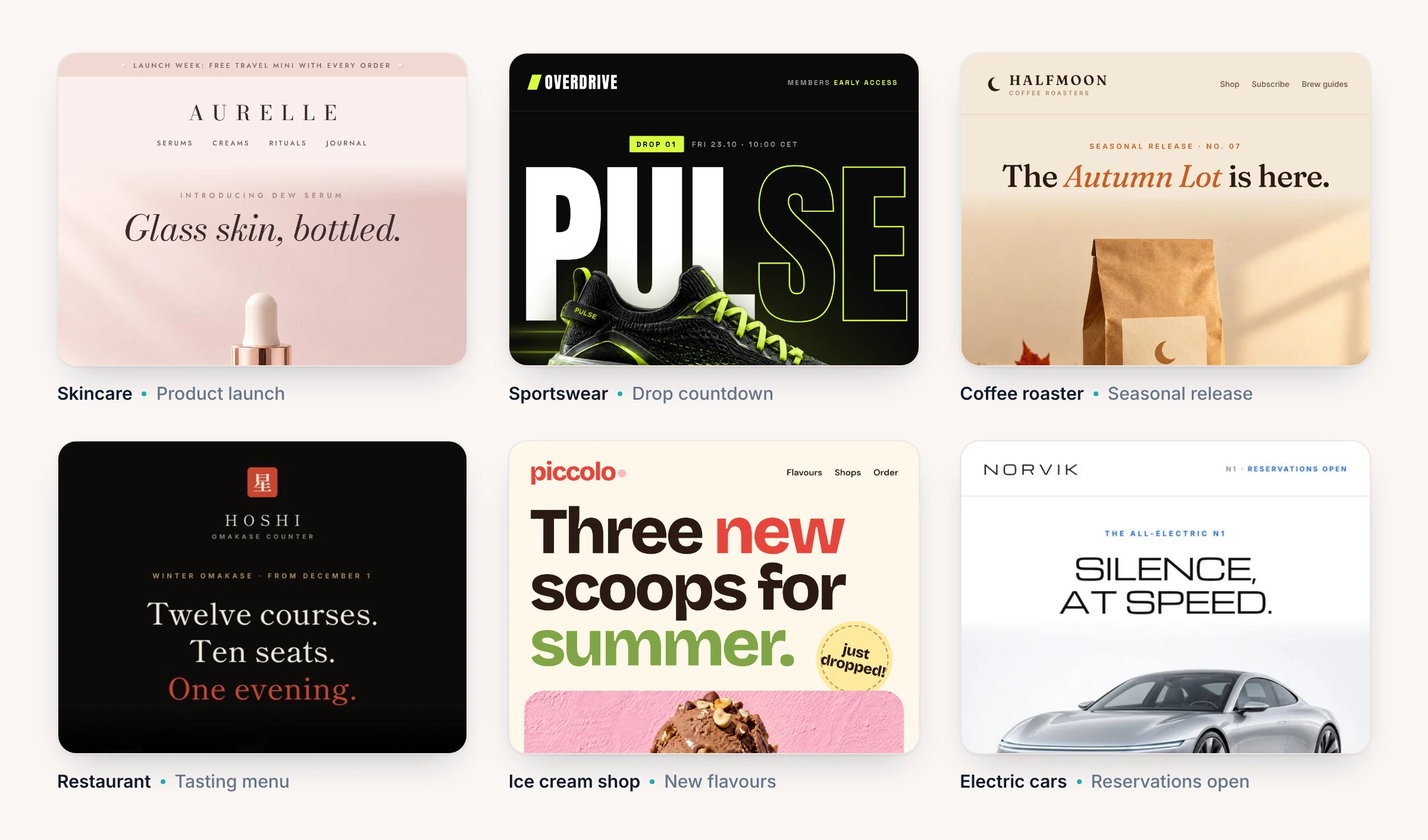
After generation, inspect the design to ensure that the most important information appears prominently. Check that the email is not overloaded with text, that images support the message, and that the main call to action is easy to identify.
5. AI Generated and Customised Images
Images can help demonstrate a product, establish an atmosphere, or make an announcement more engaging. Finding suitable visuals and preparing them for an email can also require significant effort.
Messaro allows users to generate new images within the email editing workflow. This means a marketer can request a visual change without necessarily leaving the platform to use a separate image creation tool.
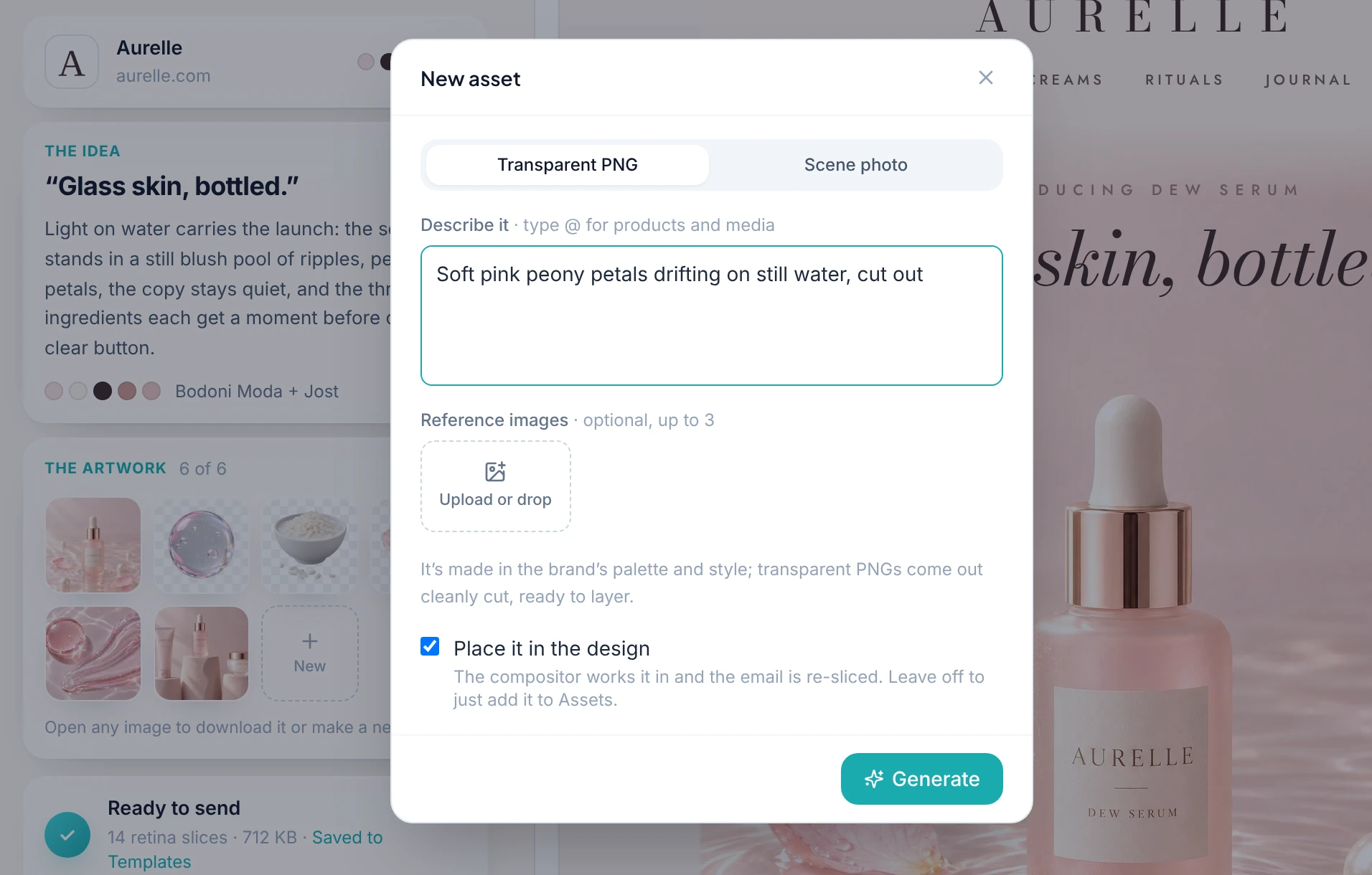
For example, a food brand launching summer flavours could request imagery that reflects the campaign's seasonal theme. A clothing business could explore visuals that complement a new collection.
The ability to create or replace images provides additional flexibility when the original design does not fully match the intended campaign.
Nevertheless, generated imagery should be reviewed carefully. Ensure that product representations are accurate, that images do not introduce misleading details, and that the visual style suits the brand. For product photography, use approved assets whenever an exact representation of the item is necessary.
6. Conversational Editing Through AI
The first generated email does not have to be the final version. One of the useful aspects of the AI builder feature is the ability to refine the design by describing the changes you want.
Instead of rebuilding the entire email, you can provide specific instructions such as:
“Make the headline shorter and more direct.”
“Move the main call to action closer to the product description.”
“Use a more premium tone and reduce the amount of promotional language.”
“Replace the current hero image with a brighter visual that suits our summer campaign.”
The AI can then help revise the relevant parts of the email.
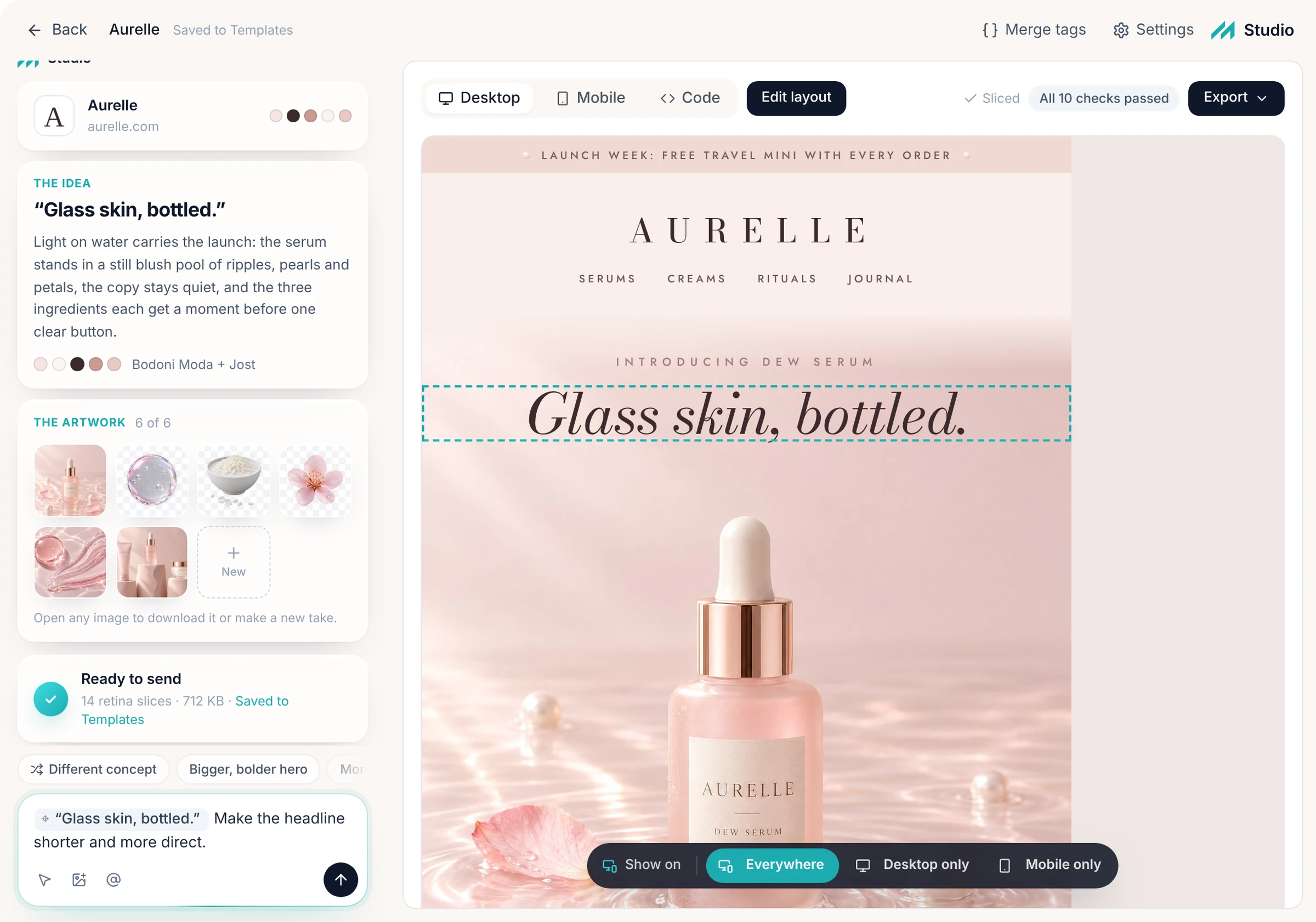
Conversational editing is particularly useful when you know what needs to change but do not want to manually adjust every design element. It also makes experimentation easier because you can explore different approaches without starting from scratch.
For the best results, make requests that describe the desired outcome clearly. If an edit affects only one section, specify that section and explain what should remain unchanged.
7. Visual Editing in Studio
AI is useful for generating a design quickly, but marketers still need direct control over the finished email.
Messaro's editing workflow allows users to make changes directly on the visual canvas, combining conversational instructions with direct changes to the design.
Within Studio, users can refine the generated result instead of relying entirely on additional prompts.
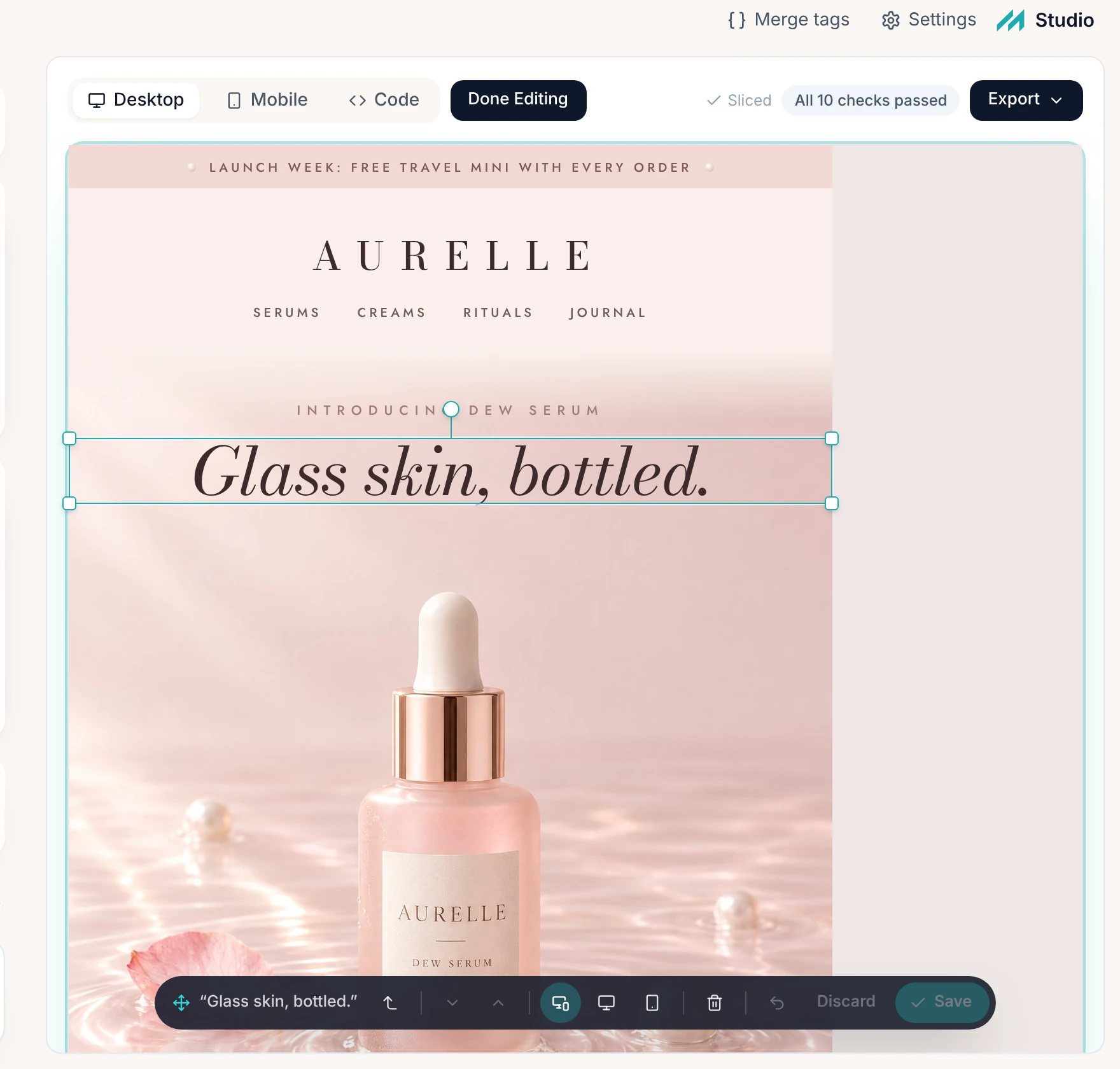
For example, you might adjust a headline, change the wording of a button, reposition an image, or modify the arrangement of content. This is valuable when the AI has produced a strong overall design but a few details need manual correction.
A practical workflow is to use AI for the first draft, conversational editing for larger creative revisions, and direct canvas editing for precise adjustments.
This combination makes the AI builder feature more flexible than a workflow that depends exclusively on generated output.
8. Faster Campaign Preparation
Creating emails from scratch involves repeated decisions about content, layout, imagery, and presentation. AI generated templates can reduce the amount of initial work required before a campaign reaches the review stage.
Businesses can use this capability to develop product announcements, seasonal promotions, newsletters, and other campaign concepts more efficiently.
However, faster generation does not mean every email should be sent immediately. Marketers should still review the content, verify the links, check the audience, and confirm the campaign's purpose.
The greatest benefit comes from using the saved time for activities that improve quality, such as audience segmentation, message testing, offer development, and performance analysis.
How to Use Messaro's AI Email Builder Step by Step
The following workflow explains how to move from a campaign idea to an email that is ready for review and sending.
Step 1: Create or Access Your Messaro Account
Visit Messaro and create an account if you do not already have one. Once you have access to the platform, open Email Studio from the sidebar and choose Studio.
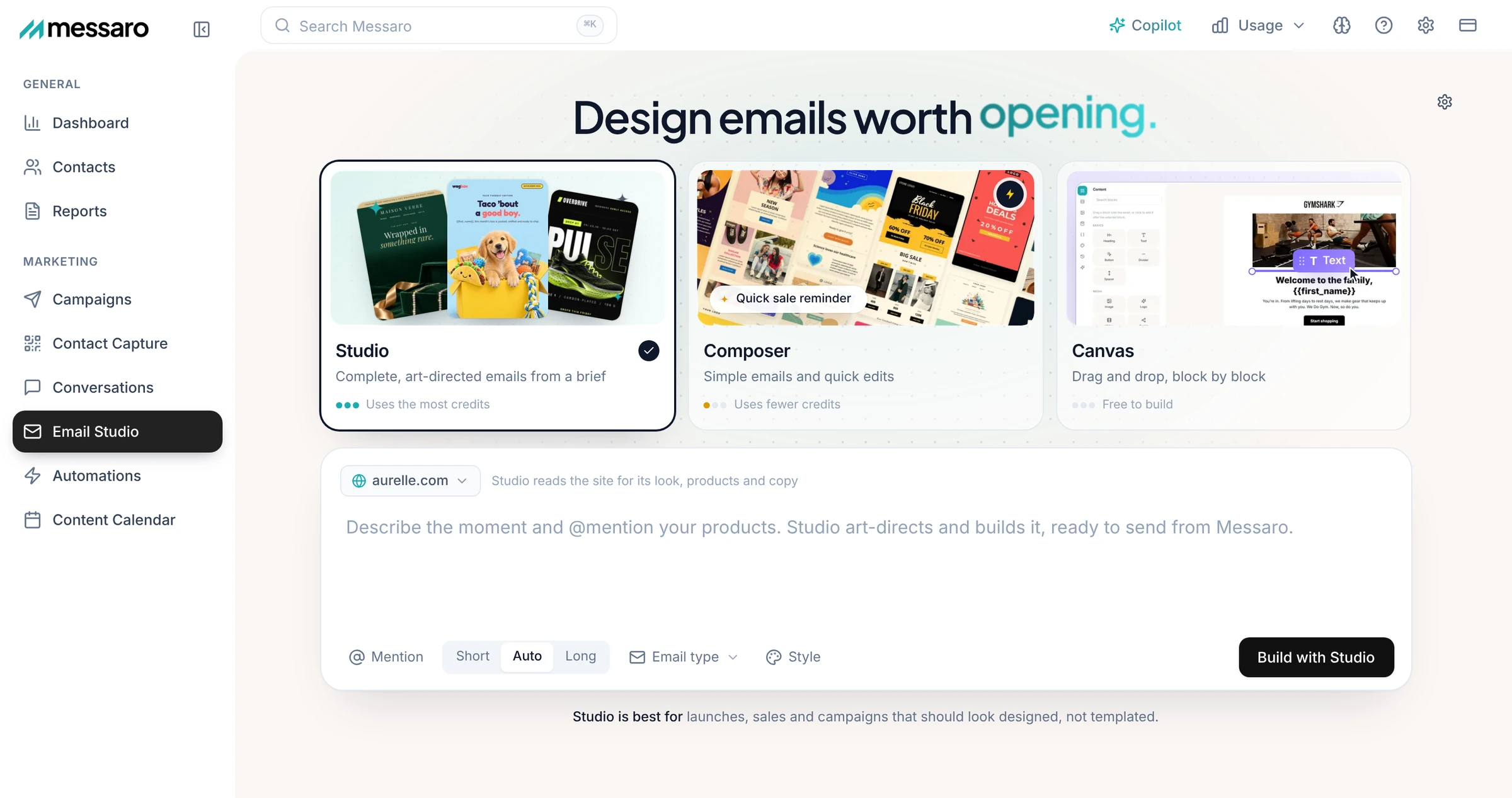
Start with a clear idea of what you want the email to accomplish. Decide whether you are announcing a product, promoting an offer, sharing useful content, or encouraging an existing customer to take another action.
A specific objective gives the AI a better starting point.
Step 2: Describe the Email You Want
Enter a prompt explaining the campaign. Include the purpose, audience, tone, key content, and desired call to action.
For example:
“Create a welcome email for new customers of our sustainable homeware store. Use a warm, modern tone, introduce our best selling products, explain our commitment to sustainable materials, and include a button inviting customers to explore the collection.”
This gives the builder both creative direction and business context.
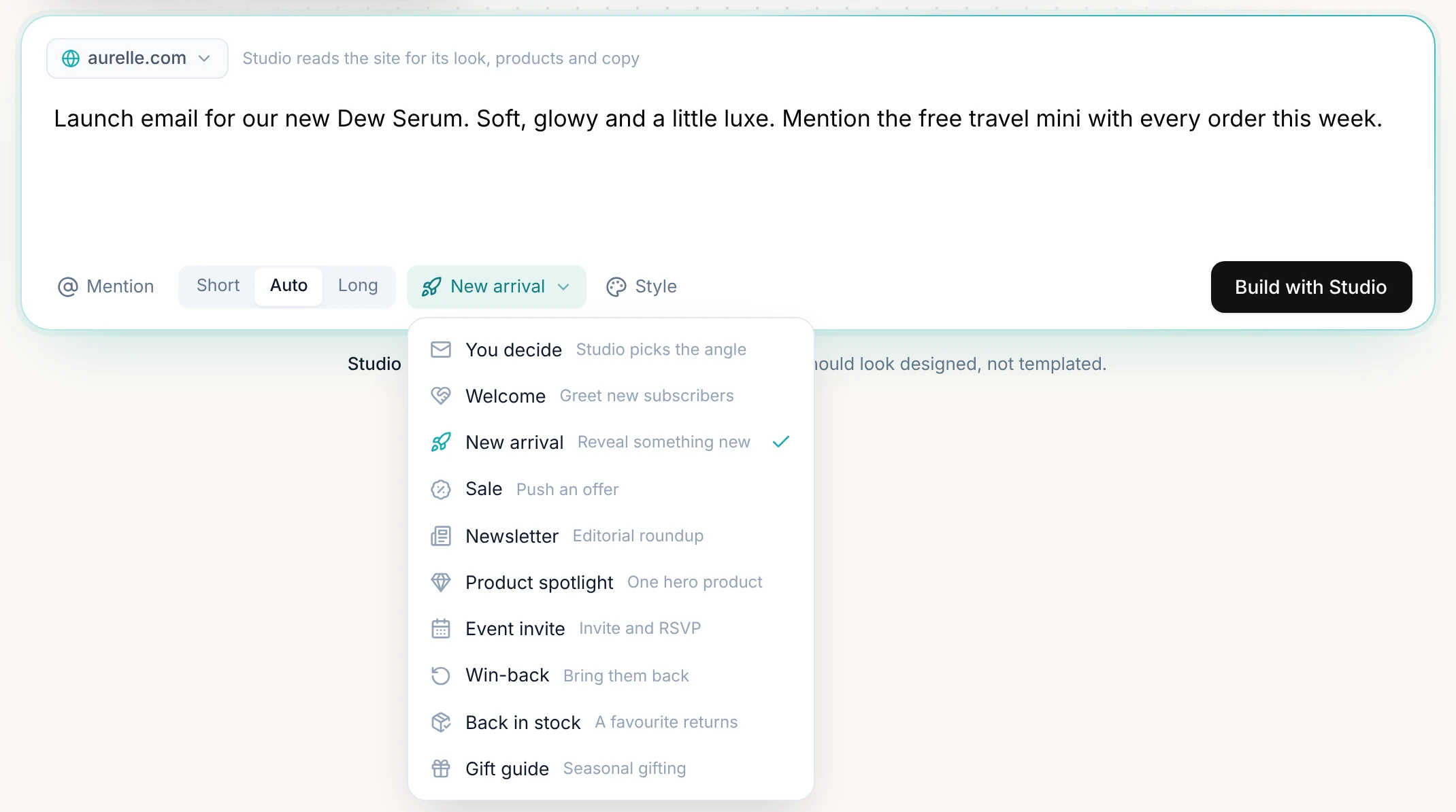
Avoid relying on vague instructions such as “make a good email.” A detailed brief is more likely to produce a useful initial design.
Step 3: Let AI Build the Initial Design
The builder uses the prompt and available website information to generate the email template. Depending on the campaign, the result can include a headline, written content, imagery, a layout, and calls to action.
Review the output as a complete customer experience rather than evaluating individual elements in isolation.
Ask yourself whether the headline communicates the main benefit, whether the imagery supports the offer, and whether the email guides readers towards a clear next step.
If the design is significantly different from what you intended, refine the prompt before making smaller edits.
Step 4: Review the Brand Alignment
Check the colours, tone, imagery, product references, and overall presentation against your brand guidelines.
Confirm that the email uses the correct product names and approved messaging. If the AI has included a promotion, price, or claim that you did not provide, verify it before keeping it.
The website may supply useful context, but it should not be treated as a guarantee that every generated detail is current.
Step 5: Refine the Email Through AI Instructions
Use conversational editing to request broader improvements. You could ask for a shorter introduction, a stronger headline, more prominent product benefits, or a different visual direction.
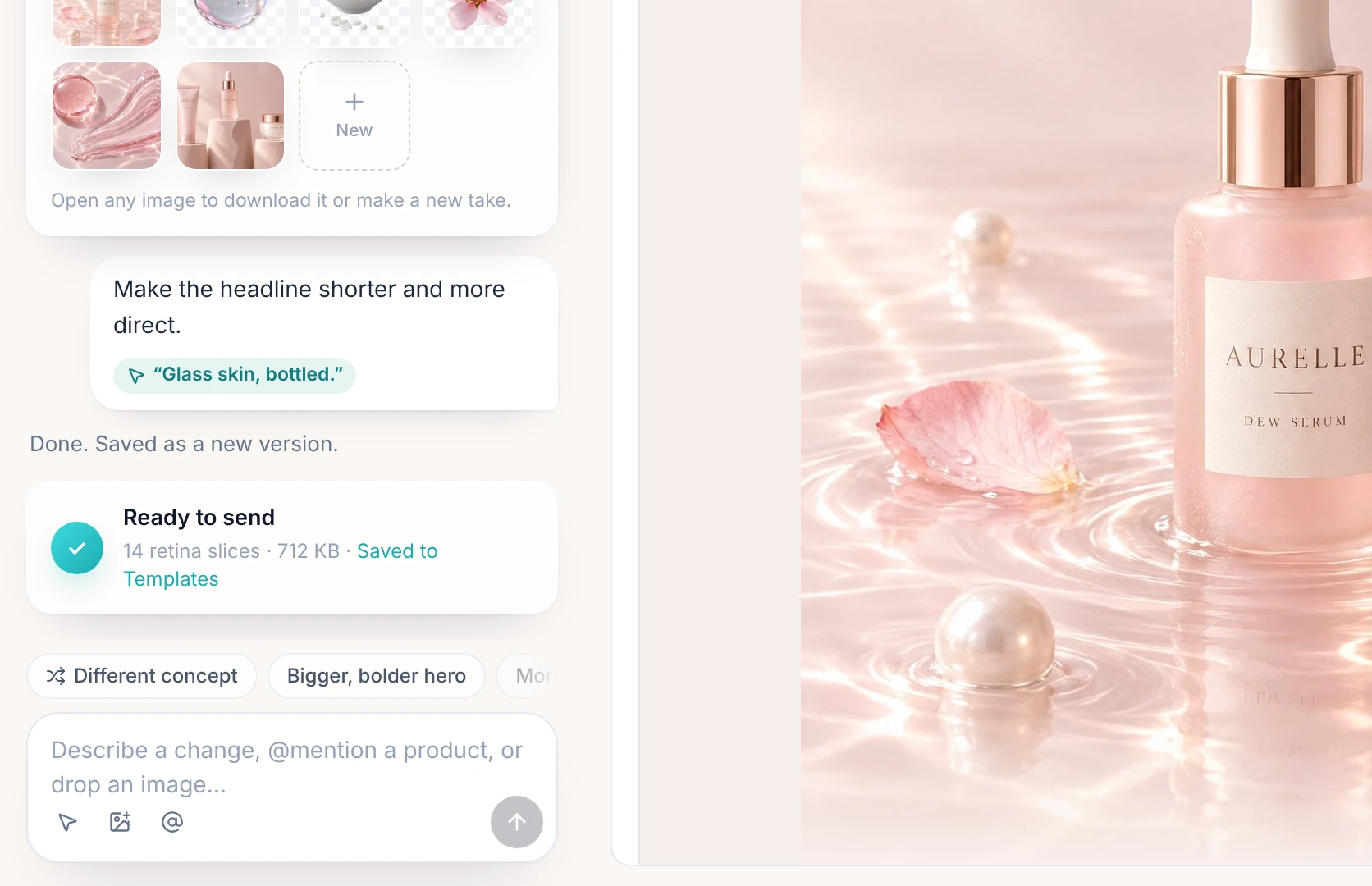
Review each change before moving to the next. Making a few focused adjustments at a time can make it easier to understand which instructions improve the result.
If the AI changes something you wanted to retain, clarify the instruction and request a more targeted revision.
Step 6: Make Direct Changes in Studio
Once the overall design is close to your requirements, use the visual editing workflow to fine tune the content and layout.
Check headings, paragraphs, image placement, buttons, spacing, and the order of information. Replace any unsuitable visual assets and make sure the email remains easy to scan.
This stage is particularly important for brands with strict visual guidelines or campaigns that include detailed product information.
Step 7: Check the Subject Line and Preview Text
The email design is only one part of the campaign. The subject line and preview text help recipients understand why the message may be worth opening. Studio only saves the finished email to Templates, so you set the subject line and preview text when you create the campaign in Campaigns.
Create a subject line that accurately represents the email and gives readers a clear reason to engage. Preview text can provide additional context without simply repeating the subject line.
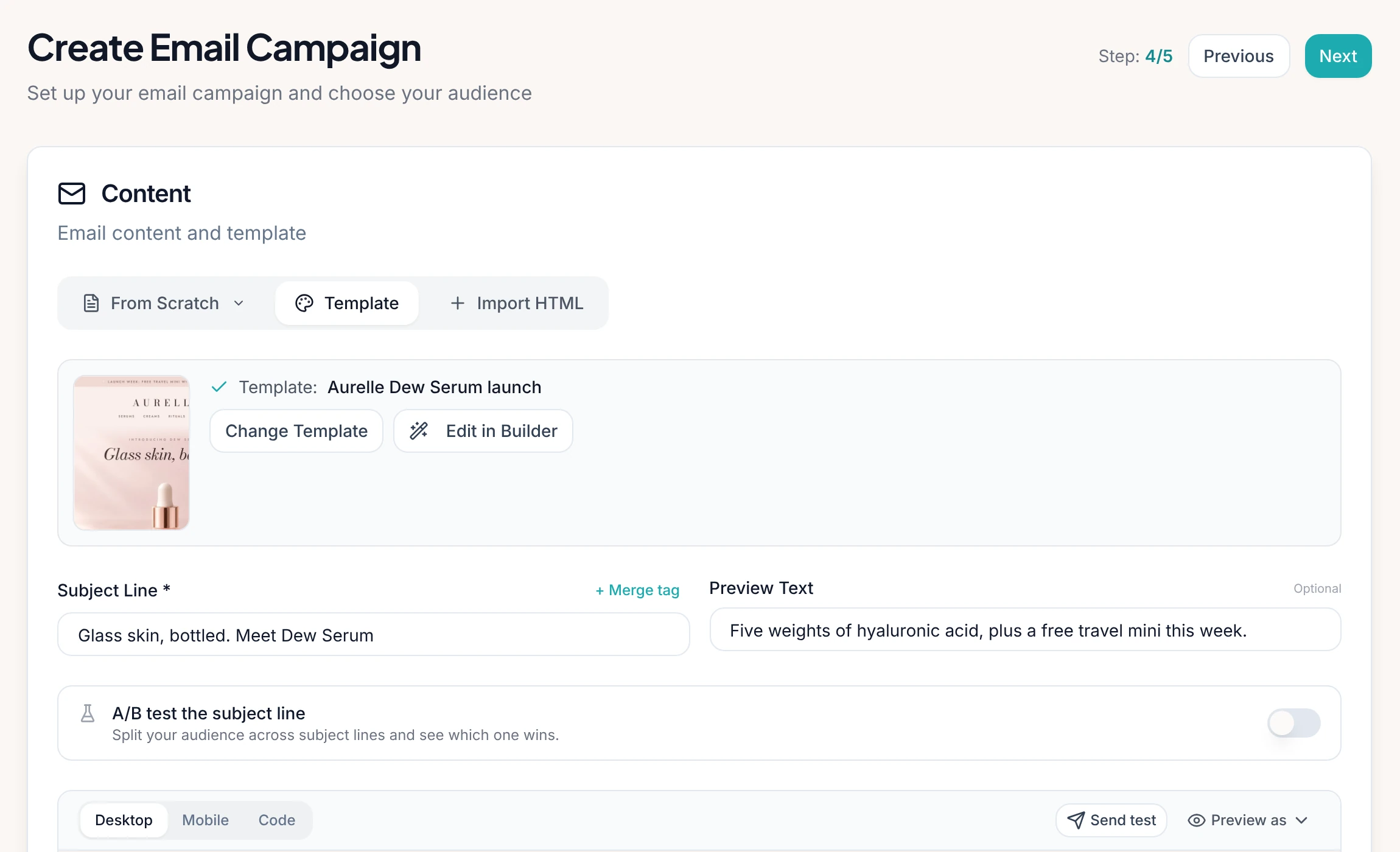
Avoid misleading urgency, exaggerated promises, or wording that does not match the content inside the email.
Step 8: Test Before Sending
Before launching the campaign, review the final email carefully.
Check that links lead to the correct pages, buttons work, images display properly, and the copy contains no spelling errors. Confirm prices, discount codes, dates, product descriptions, and other important details.
Where available, use preview and test sending options to inspect how the message appears in different email clients and on mobile devices. Make sure the text is readable, the primary action is easy to find, and the design remains understandable when images are not displayed.
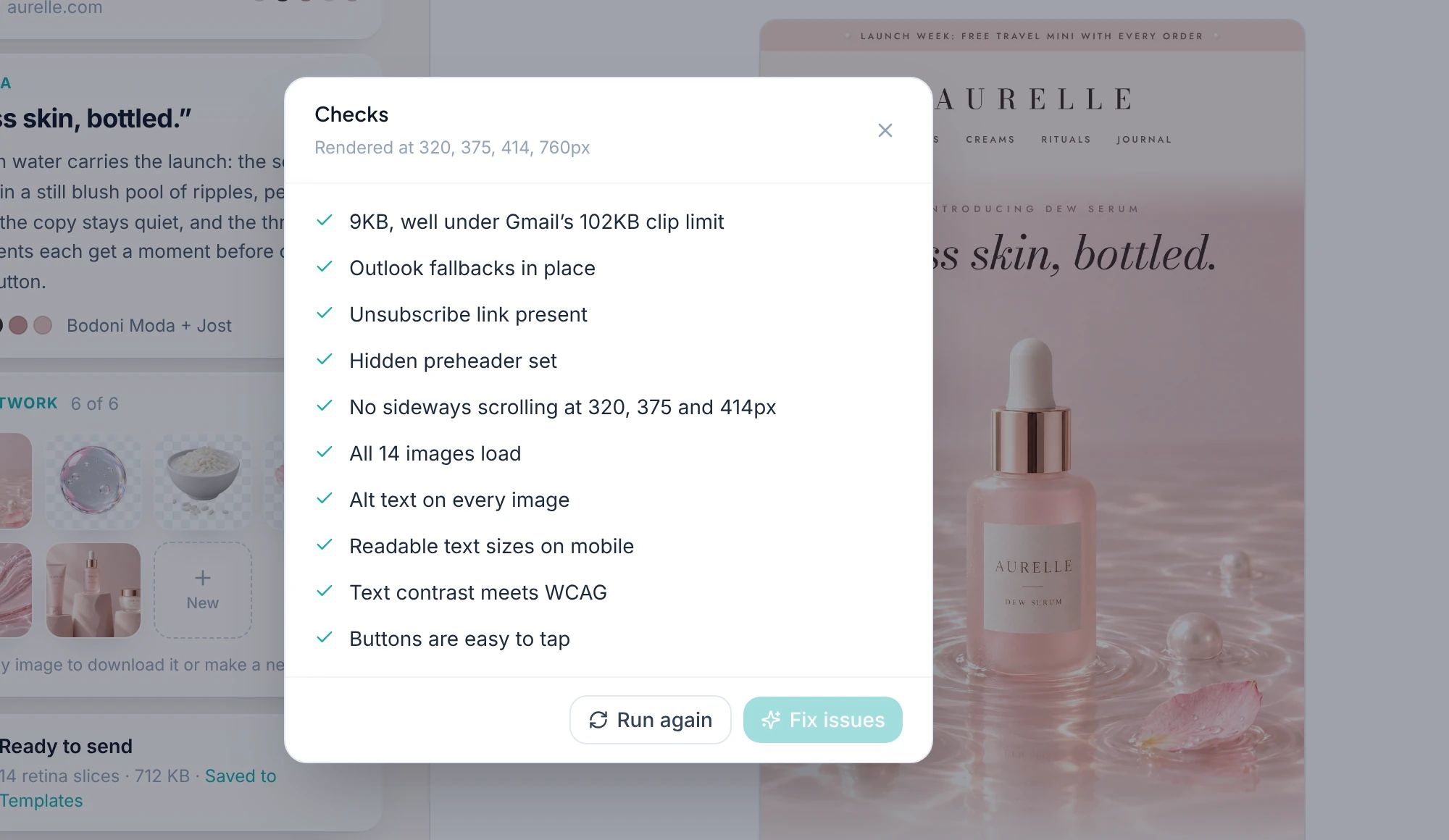
Also confirm that the correct recipient segment is selected and that your sending practices meet applicable consent and email marketing requirements.
Step 9: Send and Evaluate Performance
Once the email has passed review, prepare the campaign for sending through Messaro's email marketing workflow.
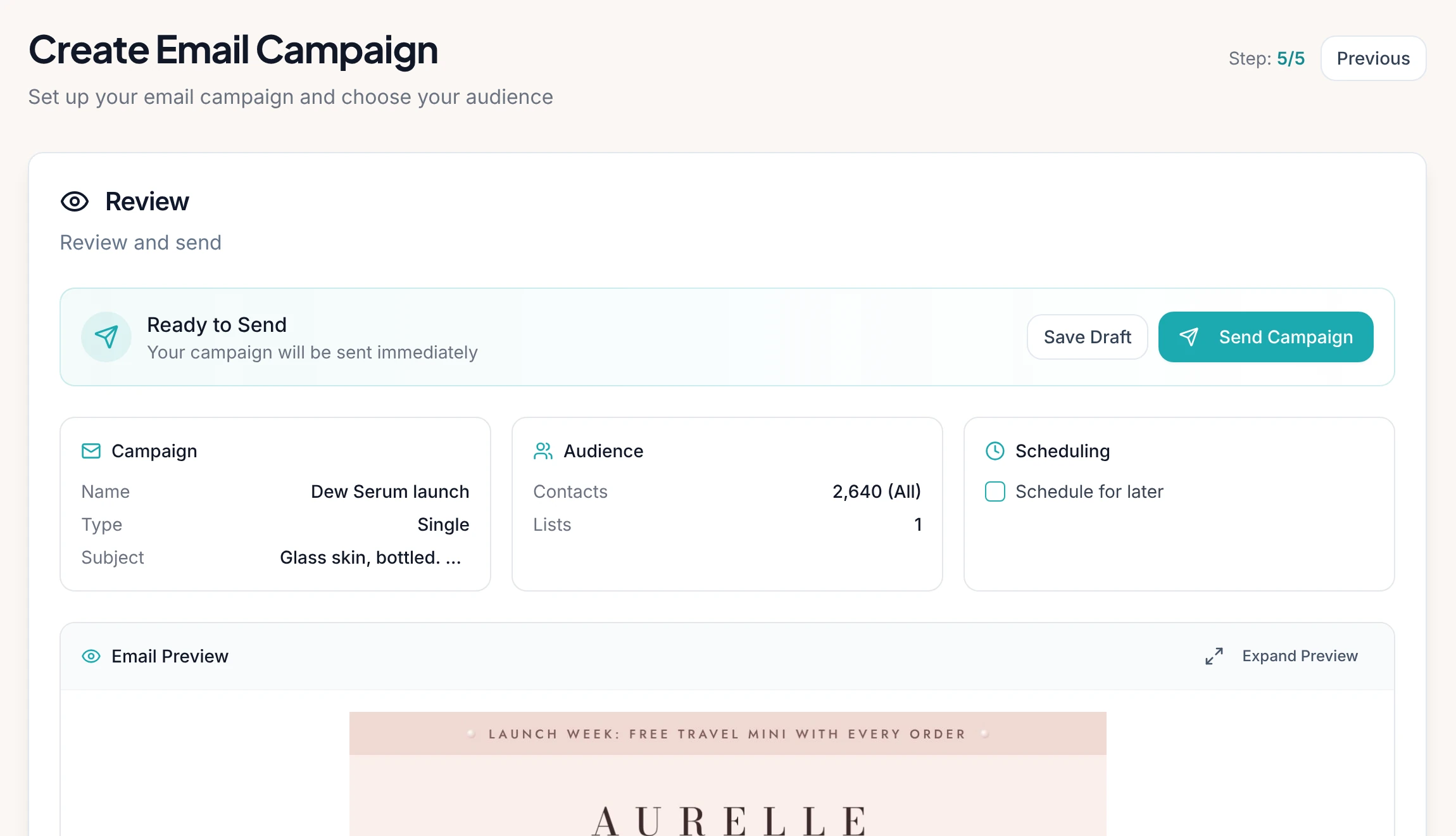
After launch, review available performance metrics, including delivery, clicks, and conversions where tracking is configured. Look for patterns that could inform future campaigns.
For example, if a product email receives clicks but few purchases, the problem may involve the landing page, product pricing, or a mismatch between the email promise and the destination.
Use those insights to improve the next campaign rather than assuming that a visually attractive email will automatically generate sales.
A Practical Example: Launching a New Product
Imagine a skincare company preparing to introduce a new moisturiser.
The marketing team needs an email that introduces the product, explains its approved benefits, includes product imagery, and directs customers to the product page.
Traditionally, the team might write the copy, gather images, prepare the layout, and move through several rounds of revisions.
Using Messaro, the marketer can begin by describing the campaign in one prompt. The builder generates an initial email using available brand context and creates a starting structure for the announcement.
The marketer then reviews the headline, checks the product information, and asks AI to shorten the introduction. If the imagery does not match the campaign's visual direction, the marketer can request a replacement image.
Next, the marketer opens the visual editing workflow and adjusts the layout, product details, and call to action. The team checks the subject line, verifies the product page link, previews the design, and sends a test email.
After launch, the team evaluates engagement and conversion data to understand whether the campaign achieved its objective.
This example shows how the AI builder feature can support the complete creative preparation process, from the initial idea to a reviewed email campaign.
Best Practices for Getting Better Results
Write specific prompts
Include the audience, objective, tone, important information, and desired action. The more clearly you explain the campaign, the easier it is to evaluate whether the generated email meets your requirements.
Provide accurate brand information
Keep your website, product information, offers, and brand guidelines current. Relevant context helps the AI generate content that is more closely aligned with the business.
Keep the customer in focus
Do not judge an email solely by its appearance. Consider what the recipient needs to know, what question the message answers, and what action makes sense next.
Review every factual claim
AI generated text can contain inaccurate details or unsupported statements. Check product claims, prices, dates, discounts, guarantees, and any other information that could mislead a customer.
Make accessibility a priority
Use readable text, sufficient colour contrast, descriptive image text where supported, and meaningful button labels. Avoid placing essential information only inside images.
Test different approaches
Where your email platform supports appropriate testing, compare alternative subject lines, messages, or layouts. Use meaningful outcomes to decide which version performs better rather than choosing based only on personal preference.
Who Can Benefit From Messaro's AI Email Builder?
The AI builder feature can be useful for businesses that want to produce professional email campaigns without making every design decision manually.
Small businesses can use it to create welcome messages, announcements, and promotions without needing a dedicated email designer for every campaign.
Ecommerce brands can develop product launches, collection announcements, and seasonal campaigns while retaining the ability to review product imagery and information.
Marketing agencies can use AI generated designs as starting points for client campaigns, then adapt the content to each client's brand guidelines and objectives.
Content and marketing teams can explore different creative directions more quickly and use the resulting time for audience research, strategy, and performance improvement.
Growing companies can establish a more consistent campaign creation process as their marketing needs expand.
The value will depend on the complexity of the campaign, the quality of the available brand information, and the amount of review required. Highly specialised campaigns may still need substantial manual design work, but the builder can provide a useful starting point.
Why Choose Messaro for AI Powered Email Creation?
Creating effective email campaigns should not require marketers to manage every part of the process through separate tools. A connected workflow can make it easier to move from an initial idea to a reviewed design and a measurable campaign.
Messaro brings AI assisted email creation into a wider email and SMS marketing platform. Its builder helps generate the initial email design, while conversational editing and the visual Studio workflow allow marketers to refine the result.
Beyond email creation, Messaro offers marketing automation, campaign analytics, and an AI Copilot designed to help users prepare marketing content and manage related workflows. These capabilities can support a broader approach to customer communication rather than treating email design as an isolated activity.
Our goal at Messaro is to help businesses spend less time dealing with repetitive marketing tasks and more time creating meaningful customer experiences. We give marketers a practical way to turn campaign ideas into designed emails while keeping them in control of the final message.
Whether you are introducing a new product, promoting a seasonal offer, or building a regular newsletter, our platform can help simplify the creative process and give your team a more efficient starting point.
Frequently Asked Questions
What is Messaro's AI email builder?
Messaro's AI email builder is a tool that generates a complete email template from a natural language description. It can use website information about a business's colours, brand voice, and products to help create the layout, imagery, and copy.
Do I need coding or graphic design skills to use the builder?
The builder is designed to let users describe the email they want rather than manually create every element. You can then refine the generated design through AI instructions and visual editing. Reviewing the final email remains important even if you do not have technical design skills.
Can I edit an email after the AI generates it?
Yes. You can refine the result through conversational editing, direct changes on the visual canvas, and new images generated within the email workflow, rather than accepting the first result unchanged.
Should I review an AI generated email before sending it?
Yes. Check the copy, product details, prices, links, images, subject line, recipient list, and overall design. Test the email where possible and confirm that the message follows your brand guidelines and applicable marketing requirements before sending.